
Best Task Management Software tools in 2026 Free & Paid
Estimated reading time: 25 minutes, 15 secondsLast updated on July 28th, 2026 at 09:32 am
Boosting Productivity is the key mantra for making a business successful. Everyone is aware of the fact that in order to increase productivity, one needs unified planning, organizing, allocating, and tracking the status of assigned tasks to the workforce, allowing management to reach goals and desired objectives quickly and effectively.
Now, the Big Question that lies ahead of us is how to tackle such a hectic responsibility to manage all the employees of an organization. Manually, and that too without using technology? No way! Such an ample managerial task if done without involving any usage of application software, then Boosting Productivity would become a Herculean task for most of us.
To save you from such a Nightmare and to tackle the situation smartly, exclusively for you, we have brought 12 Best Task Management Software Tools that will assist you in performing all your management-related activities, thereby ensuring the highest Productivity of your company.
So, Eager to know about the Task Management Software tools now! Running short of time? Have patience. Here is the list of the 12 Best Task Management Software tools that you can use to handle your managerial job easily.
| Task Management Software | Key Features | Basic Pricing | Visit site |
| ClickUp | Visual Task Manager Dashboard, Time Tracking and Reporting Tools, 24/7 Customer support services | Free | Try Now |
| Airtable | Easy Drag and Drop interface, Ample of Storage and Restore Backups, 24/7 Support services | Free | Try Now |
| TeamWork | 100+ Pre-Designed Templates, HelpDesk tools, Project Health Tab, Collaborate, Chat, and Talk face-to-face with your teammates | Free | Try Now |
| Todoist | Easy to Add Tasks, Enjoy Unlimited Storage, Set up Reminders or Alerts, Create and share your workloads, Receive timely Notifications | Free | Try Now |
| Trello | Create a Task Card Easily, quickly add the team members, add colors to your task, collaborate with office tools with Trello to sync tasks | Free | Try Now |
| Monday.com | Offers an easy user interface with boards and columns, Gantt chart views, creates tasks and projects, and allows real-time collaboration | Free | Try Now |
| SmartSheet | Grid/Kanban/Gantt View, Collaborates with the third-party software, access control, and authorization features | Free | Try Now |
| MeisterTask | Appealing Dashboard layouts, Drag and Drop interface, Create 1000+ records, Integration of 150 + office tools | Free | Try Now |
| BigContacts | Send and Receive Emails, Create Reminders or Alerts, collaborate with other tools, monitor and control the sales | $5 per user per month | Try Now |
| Asana | Integration of 270+ office tools, Add, Set Due Dates and Create tasks, Add labels to your tasks, Assign Tasks a priority level | Free | Try Now |
| BaseCamp | Collaborate on office-related apps, enjoy 30 days of free trials, limitless storage, and pre-designed themes. Create a Task Card | Free | Try Now |
| Wrike | Create 1000+ records, 24-hour customer help, add and slide activities, and quickly add the members of your team | Free | Try Now |
Before we start any further with the detailed explanation of the above-mentioned Task Management Tools, wouldn’t you like to know what Task Management actually is?
What is Task Management?
In simple words, Task management means the Synchronized process of managing the Workforce of an organization by allocating tasks, setting priorities, scheduling tasks by assigning deadlines, tracking and monitoring the progress reports of the employees on a regular basis, and more.
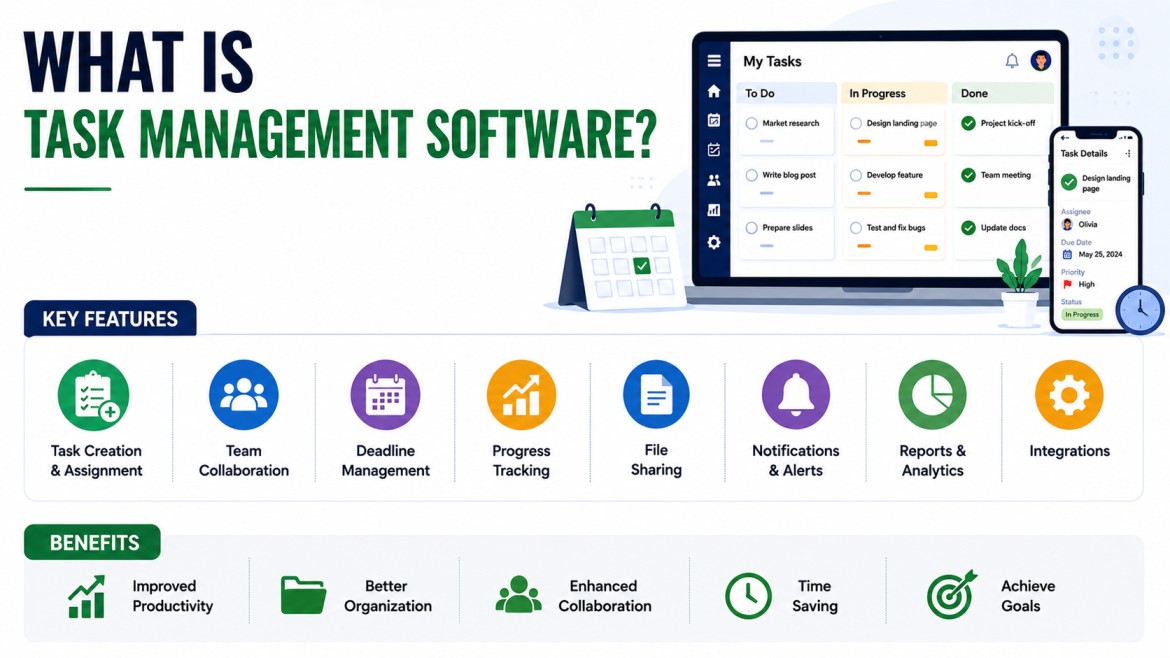
Task Management is not limited only to the firm or an industry. Even planning, organizing and strategizing tasks on an individual level also comes under the framework of the Task Management process.
Task Management, in a nutshell, requires one to carry out the functions which are stated as under:
- Assigning of Task
- Setting the Deadlines of the Task as per its Priority
- Assigning Responsibility
- Tracking and monitoring the Progress report on a daily basis
- Round-the-Clock Communication with the Team
- Keeping Records of the Task
- Adding relevant notes on the Task
To handle all the above functions, one would needfully require a Task management software tool to efficiently carry out all these above Task Management processes to Boost Productivity of the Firm.
Let’s not spend any of your valuable minutes and get started soon.
12 Best Task Management Software Tools 2026
Managing tasks efficiently is essential for improving productivity and keeping your team organized. To help you choose the right solution, we’ve compiled a list of the 12 best task management software tools in 2026 that simplify planning, tracking, and collaboration.
These tools are designed to handle everything from daily task organization to complex project workflows, making them suitable for businesses, teams, and individuals alike. Let’s start with one of the most popular choices—ClickUp.
12 Best Task Management Software Tools
1. ClickUp – Overall Best Task Management Software
2. Airtable – Flexible Task & Workflow Management Tool
3. Teamwork – Best for Client & Project Management
4. Todoist – Simple & Best Task Manager for Individuals
5. Trello – Visual Kanban Task Management Tool
6. Monday.com – Best Workflow & Team Collaboration Tool
7. Smartsheet – Enterprise-Level Task Management Software
8. MeisterTask – Easy-to-Use Task Collaboration Tool
9. BIGContacts – CRM-Based Task Management Solution
10. Asana – Best for Structured Task & Project Planning
11. Basecamp – Simple Team Communication & Task Tool
12.Wrike – Advanced Task Tracking & Reporting Tool
1. ClickUp – Overall Best Task Management Software
Need a task management tool that offers powerful features without long-term costs? ClickUp stands out by combining unlimited task creation, built-in collaboration, and flexible project tracking in one platform making it suitable for individuals, startups, and growing teams.

The free plan includes up to 100MB of storage, real-time chat, integrations with popular office apps, and customizable workflows, helping teams manage projects efficiently without switching between multiple tools. Its intuitive interface allows you to organize tasks, assign responsibilities, and track progress with ease.
For teams that want scalable task management with strong collaboration tools at zero cost, ClickUp delivers a balanced mix of performance, flexibility, and affordability, making it a reliable choice for daily productivity and project management.
Key Features of ClickUp
Designed for teams that want better control, clear visibility, and smooth collaboration, ClickUp brings multiple productivity tools into one place.
- Visual Task Dashboard: Get a clear view of task status, priorities, and deadlines with List, Board, and Timeline views.
- Goal Tracking with Kanban Boards: Plan workflows and monitor progress using flexible boards that keep everything organized.
- Built-in Team Chat: Communicate instantly with team members through real-time messaging, reducing dependency on external apps.
- 200+ App Integrations: Connect with tools like Google Workspace, Slack, and others to streamline your workflow.
- Time Tracking & Reports: Track work hours and generate detailed reports to measure productivity and progress.
Pricing
The various plans and its prices offered by ClickUp are tabled as under:
| Plans and its Prices | Best for who? | Storage | Pricing per member per month |
| Free Forever | For Personal Use | 100 MB Storage | No Cost Required |
| Unlimited Plan | For Small-Sized Teams | Unlimited Storage | $7 per member per month |
| Business Plan | For Mid-Sized Business | Unlimited Storage | $12 per member per month |
2. Airtable – Flexible Task & Workflow Management Tool
When flexibility matters more than rigid workflows, Airtable stands out by combining the simplicity of spreadsheets with the power of a database. Its clean interface and drag-and-drop functionality make it easy to organize tasks, customize workflows, and manage projects without complexity.

What makes Airtable different is its ability to adapt to multiple use cases. From task tracking and project management to content planning and data organization, it allows teams to structure work exactly the way they need. The visual dashboard and customizable views help you stay on top of progress while keeping everything easy to manage.
For teams looking for a tool that offers customization, visual clarity, and multi-purpose functionality, Airtable provides a smart and scalable solution for managing both tasks and data efficiently.
Key features of Airtable
If your workflow needs flexibility + structure, Airtable brings a system where tasks, data, and collaboration stay organized without complexity.
- Multiple Work Views (Grid, Kanban & More): Track progress your way with visual layouts that make planning and monitoring simple.
- Smooth Drag-and-Drop Workflow: Update tasks, move records, and manage projects with an intuitive, user-friendly interface.
- Powerful Integrations & API Access: Connect with external tools to automate processes and streamline operations.
- Free Plan with Strong Capacity: Manage up to 1000+ records, making it suitable for small teams and early-stage projects.
- Ready-Made Templates: Save time using pre-built templates for project tracking, content planning, and team workflows.
- Secure Storage & Backup Options: Store data safely and restore backups when needed, ensuring reliability.
- Reliable Customer Support: Access consistent support services for quick issue resolution.
- Built-In Collaboration Tools: Share files, add comments, and communicate using attachments, images, and more—all within one workspace.
Pricing
Pricing policy of various Plans offered by Airtable are given as under:
| Plans and Prices | Records Per Base | Attachment Size | Price per seat per month |
| Free (For Individuals or Small Team) | 1,000 Records | 1 GB | Free Forever |
| Team (For Team building Apps) | 25,000 Records | 20 GB | $20 per month |
| Business (For teams Requiring extra features) | 100,000 Records | 100 GB | $45 per month |
3. Teamwork – Best for Client & Project Management
Managing tasks shouldn’t depend on one device, and that’s where Teamwork fits perfectly. Whether you’re working from your phone, laptop, or desktop, it keeps your projects accessible and in sync, so nothing slows you down.

What makes it easy to use is its visual task views. You can switch between List, Kanban boards, or Tables depending on how you prefer to manage work. This helps managers stay on top of tasks, track progress clearly, and keep the team aligned without confusion.
If you need a tool that offers smooth access, simple tracking, and better team coordination, Teamwork delivers a practical solution for handling everyday projects without complexity.
Key features of Teamwork
Built for teams that need clarity, coordination, and client collaboration in one place, Teamwork focuses on keeping projects structured and easy to manage.
- Ready-to-Use Project Templates: Start faster with 100+ pre-designed templates tailored for different workflows and industries.
- Integrated HelpDesk Support: Manage client queries and requests directly with built-in helpdesk tools, improving response time and service quality.
- Real-Time Team Communication: Stay connected through chat, collaboration tools, and direct communication, keeping everyone aligned.
- Project Health Insights: Monitor task progress with a dedicated project health view, giving managers better visibility and control.
- Client & Team Collaboration: Bring your team and clients together on one platform for transparent communication and smoother project execution.
- Flexible Task Movement: Easily update, move, and track tasks as work progresses, ensuring nothing is missed.
Pricing
The Cost of utilizing the above key features (Prices of the various plans offered) is tabulated as under:
| Plans and its Features | Project Templates | Storage | Price per User per month |
| Free Forever (5 Users Minimum) | 2 | 100 MB | $0 per month |
| Basics (3 Users Minimum) | 20 | 100 GB | $9.99 per month |
| Accelerate (5 Users Minimum) | 50 | 200 GB | $24.99 per month |
4. Todoist – Simple & Best Task Manager for Individuals
Managing daily tasks becomes easier when everything is organized in one place, and Todoist does exactly that. It offers a clean, distraction-free interface where you can quickly add, prioritize, and track tasks, making it perfect for both personal and professional use.

Whether you’re a student, professional, freelancer, or managing family tasks, Todoist adapts to your routine. You can create task lists, set deadlines, and stay consistent with your goals without feeling overwhelmed. Its simple design helps you focus more on completing tasks rather than managing the tool itself.
For anyone looking for a reliable to-do list app with flexibility and ease of use, Todoist provides a practical solution to stay organized, improve productivity, and manage multiple tasks efficiently from a single platform
Key Features of Todoist
When your day is packed with tasks, having a system that keeps everything clear, organized, and on track makes all the difference—Todoist is built exactly for that.
- Quick Task & Subtask Creation: Capture ideas instantly and break them into manageable subtasks for better clarity and execution.
- Smart Task Prioritization: Assign priority levels to focus on what matters most, especially time-sensitive work.
- Reminders & Due Date Alerts: Stay on schedule with timely notifications and reminders, reducing the chances of missed deadlines.
- Flexible Work Views (Kanban Style): Visualize tasks using board-style layouts for better planning and workflow tracking.
- Team Collaboration Made Simple: Share tasks, assign responsibilities, and keep everyone aligned in one organized space.
- Seamless Tool Integrations: Connect with other apps to maintain smooth and uninterrupted workflows.
- Premium Features for Growth: Access advanced themes, expanded storage, and enhanced customization in higher plans.
Real-Time Notifications: Get updates when tasks are delayed or completed, helping you stay in control at all times.
Pricing
Pricing policy of the various plans offered by the Todoist task management application software is tabulated as follows:
| Plans and its Features | Key takeaways | Price per month |
| Beginners (Start Organizing your life and work for free) | 5 Personal Projects, 5 MB File Uploads, 7-day Backup Plan | Free |
| 5 Personal Projects, 5 MB File Uploads 7-day Backup Plan | 300 Personal Projects, 100 MB file Uploads, Unlimited BackUp | $5 per member per month |
| Pro (Optimize every part of your life and work with Todoist Pro) | 500 Team Projects, Unlimited Tools collaboration, Free BackUp | $8 per member per month |
5. Trello – Visual Kanban Task Management Tool
Prefer managing tasks visually with a simple drag-and-drop system? Trello makes it easy to organize work using Kanban-style boards, where you can move tasks across stages and track progress at a glance.

Its clean interface lets you create boards, lists, and cards to structure projects the way your team works. With ready-made templates and customizable themes, you can quickly set up workflows for different use cases whether it’s project tracking, content planning, or daily task management. The free plan also allows you to create multiple boards, making it suitable for individuals and small teams.
For users who want a visual, easy-to-use, and flexible task management tool, Trello offers a practical solution to manage tasks, collaborate with teams, and stay organized without complexity.
Key Features of Trello
When tasks need to move fast and stay visible, Trello keeps everything organized, visual, and easy to manage without adding complexity.
- Instant Workspace Setup: Launch projects quickly using ready-made templates designed for different workflows.
- Focus on What Matters: Highlight important tasks with labels and priority markers so nothing critical gets missed.
- Drag-and-Drop Task Flow: Move task cards across boards to reflect progress. Simple, visual, and intuitive tracking.
- Quick Team Collaboration: Add team members to boards instantly and keep everyone aligned in one shared workspace.
- Color-Coded Priorities: Organize tasks visually using color labels, making it easier to identify urgency at a glance.
- Seamless Tool Integrations: Connect with tools like Google Docs, Slack, and others to streamline daily operations.
- Reliable Support Access: Get help whenever needed through dedicated support channels.
Pricing
The Pricing policy of the various plans offered by Trello is tabulated as under:
| Plans and Pricing Features | Key TakeAways | Price per member per month |
| Free (For individual or teams looking to organize any projects) | Unlimited Cards & Storage, 10 Boards per Workspace | Free Forever |
| Standard (For small team need to manage work and scale collaboration) | Unlimited Boards, Advanced Checklist, Unlimited Storage | $5 per user per month |
| Premium (For teams that need to track and visualize multiple projects) | Calendar and Timeline Tables, Unlimited Workspace | $10 per user per month |
| Enterprize (For organizations that need to connect work across teams) | Unlimited Workspace, Tables and Calendar | $17.50 per user per month |
6. Monday.com – Best Workflow & Team Collaboration Tool
When tasks, deadlines, and team updates start piling up, having a system that brings everything together becomes essential. Monday.com does exactly that. It transforms scattered work into a clear, visual workflow where every task, owner, and deadline is easy to track.

Instead of juggling multiple tools, you can plan projects, assign tasks, and monitor progress in real time from one dashboard. Its flexible structure adapts to different teams, whether it’s marketing, development, or operations, helping you maintain consistency and reduce delays.
For teams aiming to simplify workflows, improve coordination, and deliver projects faster, Monday.com provides a structured yet flexible environment that keeps work moving efficiently without confusion.
Key Features of Monday.com
Built for teams that need structure without rigidity, Monday.com turns complex workflows into clear, trackable systems that are easy to manage.
- Custom Workspaces & Boards: Design workflows your way with fully customizable boards tailored to your team’s needs.
- Simple & Visual Interface: Manage tasks, projects, and data using intuitive columns and layouts that improve clarity.
- Gantt Chart Timeline View: Track deadlines and dependencies with visual timelines to keep projects on schedule.
- Multi-Device Accessibility: Work seamlessly across Android, iOS, and desktop, ensuring access anytime, anywhere.
- Advanced Permission Controls: Set roles and access levels to control who can view, edit, or manage tasks.
- Task Assignment & Progress Tracking: Create tasks, assign team members, set deadlines, and monitor real-time progress.
Live Collaboration Tools: Communicate instantly with comments, @mentions, and notifications, keeping teams aligned.
Pricing
Pricing policy of the plans offered by Monday.com is provided in a tabular format as under:
| Plans and its Features | Key Points | Pricing per user per month |
| Free (For Individuals looking to keep track of their work) | 3 Boards, Unlimited Docs, 200+ Templates, 8 Column Types, Add 2 team members | Free |
| Plans and their Features | Unlimited Free Viewers, Unlimited Items, 5 GB File Storage, Prioritize Customer Support | $9 per seat per month |
| Standard (Collaborate and optimize your team) | Private Boards and Docs, Chart Views, Time Tracking, and add 10 Boards in your Workspace | $12 per seat per month |
| Pro (Streamline your complex workflows) | Basic (Manage all your teamwork in one place) | Timeline and Gantt views, Calendar Views, Guest Access, and Add 5 Boards in your Workspace |
7. Smartsheet – Enterprise-Level Task Management Software
Excellent Project Management, Easy to Track Tasks, pre-designed templates, and more features like such you’ll enjoy with the Smartsheet Task Management Software tool. Task monitoring and collaboration software that aids teams and organizations in planning, tracking, automating, and managing work processes, projects, and tasks.

Drag and Drop Interface, Add Members in your boards and whatnot with SmartSheet Task Management Application Software. For reference, try reading the features listed as follows:
Key Highlights of Smartsheet
When projects demand both structure and flexibility, Smartsheet brings spreadsheets, automation, and collaboration together in one powerful workspace.
- Multiple Work Views (Grid, Kanban, Gantt): Plan, track, and manage projects using flexible visual formats that suit different workflows.
- Built-In Communication Tools: Collaborate with ease using comments, @mentions, and file sharing, keeping conversations linked to tasks.
- Seamless Integrations: Connect with tools like Microsoft Office, Google Workspace, and more to maintain a smooth workflow.
- Advanced Reporting & Dashboards: Create real-time reports, charts, and dashboards to monitor progress and make data-driven decisions.
- File Attachments & Data Access: Attach documents, images, and records directly to tasks for quick and organized access.
- Cross-Platform Accessibility: Manage work from Android, iOS, or desktop, ensuring flexibility across devices.
Secure Access Controls Set permissions and roles to ensure only the right users can view or edit data.
Pricing
| Plans and its related Features | Number of Editors per Sheet | Storage | Price per user per month |
| Free (For people just getting started with task and project) | 2 Editors per sheet | 500 MB | $0 |
| Pro (For people and teams that want to track projects) | 10 Editors per sheet | 20 GB | $9 per user per month |
| Business(For businesses that want to manage projects and programs) | Unlimited Editors | 1 TB | $19 per user per month |
8. MeisterTask – Easy-to-Use Task Collaboration Tool
When task management feels overwhelming, MeisterTask keeps things simple with a clean, visual workspace that helps teams stay organized without confusion. It’s designed for users who want clarity in their workflows while keeping the interface easy and distraction-free.

The platform focuses on visual task tracking, allowing you to manage projects through intuitive boards and structured layouts. This makes it easier to monitor progress, assign responsibilities, and keep every task moving smoothly from start to finish.
For individuals and teams looking for a lightweight yet effective collaboration tool, MeisterTask offers a balanced approach—combining ease of use, visual organization, and practical workflow management to keep projects on track without complexity.
Key Features of MeisterTask
When simplicity meets visual productivity, MeisterTask helps teams manage tasks with clarity, speed, and minimal effort.
- Visual Workflow Views: Track progress using Kanban boards and structured layouts, making task management easy to understand at a glance.
- Smooth Drag-and-Drop Interface: Move tasks effortlessly across stages with a clean, user-friendly design.
- Pre-Built Dashboard Templates: Save setup time with ready-to-use project templates for faster workflow creation.
- Seamless Tool Integrations: Connect with popular apps to ensure a smooth and uninterrupted workflow.
- File Sharing & Communication: Collaborate using attachments, comments, and media sharing, keeping all discussions in one place.
- Reliable Storage & Backup Options: Store project data securely and restore backups when required.
- Cross-Device Accessibility: Access and manage tasks from desktop, Android, or iOS devices.
- Free Plan Capability: Handle multiple projects and records within the free plan, suitable for small teams and individuals.
- 24/7 Support Availability: Get assistance anytime through continuous support services.
Pricing
| Plans and its Features | Number of Projects and Tasks | Pricing per user per month |
| Free (Core task management features for single users) | 3 Projects + Unlimited Tasks | Free |
| Pro(Simple, collaborative task management for teams) | Unlimited Projects and Tasks | $7 per user per month |
| Business (Extended collaboration features for larger teams) | Unlimited Projects and Tasks | $12 per user per month |
9. BIGContacts – CRM-Based Task Management Solution
Looking for a Customer Relationship Management software tool? Then it’s the right place that you’re looking at. BigContacts is an online communication customer relationship management (CRM) application that assists organizations in managing and nurturing their client connections.
Furthermore, you may simplify your tasks for optimal productivity, increasing the efficiency of your company. BigContact allows you to keep track of your work and achieve your goals more quickly.
We have some specifics that you ought to know before buying premium services from BigContact.
Key Features of BIGContacts
When managing customers and tasks in one place becomes a priority, BIGContacts brings together CRM, communication, and task tracking into a single, organized system.
- Integrated Calendar & Task Scheduling: Plan meetings, set reminders, and track important activities with a built-in calendar and task manager.
- Email Management in One Place: Send, receive, and store emails directly within the platform, making it easy to track conversations and history.
- Lead & Sales Pipeline Tracking: Monitor leads through every stage of the sales cycle and convert prospects into customers efficiently.
- Sales Monitoring & Forecasting: Keep an eye on deals, track progress, and estimate revenue with better visibility.
- Task Alerts & Reminders: Stay updated with timely notifications to ensure no important activity is missed.
- Flexible Task Views: Organize work using Kanban-style boards for better tracking and workflow clarity.
Pricing
Pricing policy of the plans offered by BigContacts are provided in a tabular format as under:
| Plans and its Features | File Storage | Email and letter Templates | Pricing |
| Big | 1 GB | 3 | $5 |
| Bigger | 10 GB | 20 | $15 |
| Biggest | 50 GB | 100 | $25 |
10. Asana – Best for Structured Task & Project Planning
If you are a newbie and looking for unlimited tasks, Unlimited Projects, Unlimited File Storage, Calendar View, Board View, 100+ app integrations for absolutely zero cost, then you’re reading about the perfect Task Management software, Asana, that not only provides Smooth task managing atmosphere but also helps newbies and other individuals falling short of cash to handle Tasks by enjoying Task efficient features for Free.

There are many features of Asana that can offer you a seamless platform for Task management, like Kanban board views, which are available in Asana and are particularly effective for viewing task processes and moving jobs through various phases.
Key Features of Asana
When teams need clarity and coordination at scale, Asana brings tasks, timelines, and communication into one structured workspace.
- Extensive Integrations (270+ Tools): Connect with apps like Google Workspace, Slack, and more to centralize work and streamline processes.
- Built-In Time Tracking: Monitor how long tasks take to improve planning accuracy and team productivity.
- Access Across Devices: Work seamlessly on Android, iOS, and desktop, keeping projects updated from anywhere.
- Priority-Based Task Management: Set priority levels to focus on time-sensitive and high-impact work.
- Task Creation with Deadlines: Assign tasks, add descriptions, and set clear due dates for better accountability.
- Collaborators & Notifications: Add team members to tasks so they receive real-time updates and alerts.
Labels & Smart Organization: Use tags to sort, filter, and track tasks, making reporting and workflow management easier.
Pricing
The pricing policy of the various plans offered and its related features provided are as follows:
| Plans and its Features | Collaborations | Tasks and Projects | Pricing per user per month |
| Basic(For individuals or teams just getting started with project management) | With 15 Team members | Unlimited Tasks and Projects. | $0 |
| Premium (For teams that need to create project plans with confidence.) | Unlimited Collaborations | Unlimited Tasks and Projects. | $10.99 per user per month |
| Business (For teams and companies that need to manage work across initiatives) | Unlimited Collaborations | Unlimited Tasks and Projects. | $24.99 per user per month |
11. Basecamp – Simple Team Communication & Task Tool
When it comes to BaseCamp, it is a powerful task management system and project management platform that offers a wide range of capabilities to assist team members and organizations in planning, monitoring, and managing work. Furthermore, you may simplify your tasks for optimal productivity, increasing the efficiency of your company. BaseCamp allows you to keep track of your chores and achieve your goals more quickly.

Want to discover what else BaseCamp has to offer to help you improve your task management efficiency? We’ve highlighted several points below to help you get organized.
Key Features of Basecamp
When simplicity and team communication matter more than complex setups, Basecamp keeps project management clear, organized, and easy to follow.
- Visual Task Progression: Manage tasks using card-based systems, moving them across stages as work progresses.
- Quick Team Onboarding: Add team members instantly and keep everyone aligned within a shared workspace.
- Seamless Tool Integrations: Connect with apps like Google Docs, Slack, and more to maintain smooth workflows.
- Built-In Collaboration Features: Share updates, discuss tasks, and keep all communication in one centralized place.
- Real-Time Notifications & Alerts: Stay informed about updates, delays, and task changes with instant notifications.
- Free Trial Access: Explore features with a 30-day free trial before upgrading.
- Scalable Storage Options: Access higher storage and customization features in advanced plans.
- Reliable Customer Support: Get assistance anytime through continuous support availability.
Pricing
Pricing policy of the plans offered by BaseCamp are provided in a tabular format as under:
| Plans and its Features | Storage | Pricing per user per month |
| Ideal(For FreeLancers ) | 100 GB Storage | ₹350 per user per month |
| Pro (For Business) | Unlimited Storage | ₹4800 per user per month |
12. Wrike – Advanced Task Tracking & Reporting Tool
Want a Cloud-Based Task Management Software that works on every device, Android, iOS, or Windows? It’s a good idea for you to learn about Wrike, a task management Application, which can be used on any device. Furthermore, Wrike provides bright Visual task managers in list/Kanban boards/Tables and others so that managers can easily oversee and supervise the tasks allocated to the workforce.

Do you want to learn more about this task management software? Well! Read the important information presented below to get an understanding of what the Wrike Managing app truly offers.
Key Features of Wrike
When managing projects across teams and clients, Wrike focuses on bringing everyone into a single, well-organized workspace for better coordination and visibility.
- Unified Team & Client Collaboration: Keep your team and clients aligned on one platform for transparent communication and smoother execution.
- Quick Team Setup: Add members instantly to dashboards and projects, ensuring faster onboarding and task allocation.
- Dynamic Task Management: Create, update, and move tasks as progress evolves, so no activity goes unnoticed.
- Pre-Built Dashboard Templates: Save time with ready-made layouts that help you start projects without manual setup.
- Cross-Tool Integration: Connect with external tools to maintain a seamless and efficient workflow.
- Secure Storage & Backup: Store project data safely with options to restore backups when needed.
- Reliable Support Availability: Access 24/7 customer assistance for quick issue resolution.
Pricing
Pricing policy of the plans offered by Wrike is provided in a tabular format as under:
| Plans and its Features | Storage Space per user | No. of users | Pricing per user per month |
| Free (For Teams Getting Started) | 2 GB per user | Unlimited users | $0 |
| Team (For Growing Teams ) | 2 GB per user | 2-25 users | $9.80 Per user per month |
| Business (For all teams across all organizations) | 5 GB per user | 5-200 users | $24.80 Per user Per month |
Benefits of Choosing Task Management Softwares
Choosing Task Management Software can help you reap the following managerial benefits at an individual, team, or enterprise level:
- Work Efficiency– Helps to organize the work, tracking work Progress, thereby reducing managers’ effort and maintaining the efficiency level at the same time.
- Assigning Priority to Different Tasks– Using the Task Management tools, managers can set tasks according to priority to enable the workforce to focus more on time-sensitive work first.
- Enhance Teamwork Spirit– Timely delivery of the task by the team helps them to develop an essence of Teamwork within an organization, allowing the members of the team to handle the task together.
- Achieve Goals Timely– Completing the time-sensitive tasks with perfection before the deadline of the work set by the managers ensures the timely achievement of the goals Timely.
- Provides Massive Storage Space– Task Management softwares have in-built storage space due to which you do not need to take worries about the saving of google office files, emails, PDFs and other office related documents.
- Data Security– Task Management Apps even provides a good amount of Data Security making sure that your task and the data related to your projects remains secured and protected from online malicious attacks.
Task Management Software is a valuable tool that helps you deliver day to day tasks efficiently on the other hand handling the workforce effectively thereby acquiring organizational goals.
FAQ
Is task management software secure?
Yes! Task MAnagement Software tools come with an in-built Data Protection Feature that helps them manage to save their Official Data from Malicious online threats and even helps them to restore the data as per their requirement.
What are Features of a Great Task Management Tool?
The Key Features of a great Task Management Tool are provided to you as under:rn
- rn t
- Assigning the tasks to the workforce
- Prioritizing of the Task as per its time sensitivity factor
- Putting relevant Tags and comments
- Adding the Due Dates on the tasks
- Project Management
- Integrates with other Official Apps
rn t
rn t
rn t
rn t
rn t
Why Do You Need Task Management Software?
You require a Task Management software in order Synchronize your efforts and work towards achieving the goals of the organization in a timely manner.
Which task management software is best?
TeamWork, Trello, ClickUp to name a few are some of the best Task Management Software that provides you visual Task manager to supervise the work progress, effective communication channels maintaining seamless contact with your team members and has a user Friendly interface for managing the task effectively thereby raising the performance of your business entity.
Which developer task manager is best?
Trello, Todoist, and Monday are some of the top developer task organizers that can be used to handle duties such as supervising job progress, creating effective communication channels, and assisting you in meeting goals on time.
Conclusion
Through this article, you got to know the 12 Best Task Management Tools that can help you reach your business to a next level. Organizing the Workforce, Prioritizing the Official tasks, Promoting an essence of TeamWork spirit, ensuring Accountability, Protecting the Data of the official task and maintaining a Backup of the tasks, helps the Business to give a Spot On performance and in turn helping business reap high amount of profits.
Be not disheartened about paying for premium plans, one with a zero or a small budget can even go for the Free Task Management Application given in the List above.
Go, Grab and Seize the opportunity of using one of these Task Management Applications Now! And see a drastic Positive change in the working of your organization.
Looking for other Software? Here you go-
- Best Free Payroll Software
- Best Free Drawing Software
- Best AI Dubbing Software
- Best MLM Software
- Best Free Animation Software
📌 Related: 7 Best SPA Software for Small Businesses 2026 Top Ranked
📌 Related: 9 Best Construction Project Management Software In 2026
📌 Related: 9 Best Customer Success Software for Your Business 2026
