
10 Best Free Payroll Software for Small Business in 2026
Estimated reading time: 17 minutes, 26 secondsLast updated on July 28th, 2026 at 09:33 am
Do you need help with tax calculations, employee salaries, and payroll management? If yes, this guide is for you! Here, we’ll explore the Best Free Payroll Software for Small Businesses that can help simplify payroll processing, tax management, attendance tracking, and employee payments.
Imagine running a small business without a dedicated payroll or HR department. Managing employee salaries, tax filings, attendance, and compliance alongside daily business operations can become time-consuming and stressful. Manual payroll management may also increase the chances of calculation errors and delayed payments.
This is where payroll software becomes useful. It helps automate payroll calculations, employee payments, tax deductions, and reporting while reducing manual work. In this article, we’ll cover what payroll software is, compare the top 10 free payroll software solutions, and explore their key features, pricing, and business suitability to help you choose the right option for your needs.
So, without any delay, let’s get started!!
What is Payroll Software?
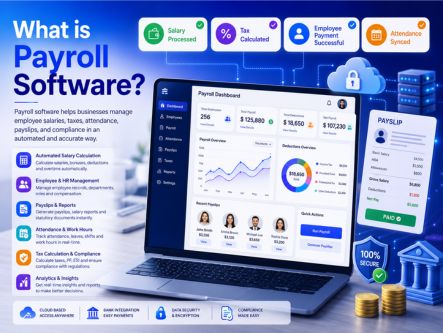
Payroll software is a tool that helps businesses manage employee salaries, wages, taxes, and payroll operations in a structured and automated way. It simplifies tasks like calculating pay, deducting taxes, tracking work hours, and generating payslips—saving time and reducing manual errors for both small businesses and large organizations.
Modern payroll tools are designed to integrate with accounting systems, attendance tracking, and HR processes, making it easier to manage everything from one place. This ensures accurate payments, compliance with regulations, and smooth handling of employee records without complexity.
Choosing the right payroll software depends on your business needs, such as team size, budget, and required features. To make your decision easier, we’ve listed the best free payroll software options with their key features and pricing, so you can compare and select the most suitable solution quickly.
Top 10 Free Best Payroll Software for Small Business
Choosing the best payroll software for a small business can be difficult because different tools offer different features, pricing, and automation capabilities. Small businesses usually need a solution that is easy to use, cost-effective, and capable of handling payroll processing, employee payments, tax calculations, attendance tracking, and compliance efficiently. To help simplify your search, we’ve compared the top 10 best free payroll software solutions based on features, usability, scalability, and overall value, so you can choose the right option for your business needs.
1. Payroll4free – Overall Best Free Payroll Software
2. HR.my – Best Free Payroll Software
3. TimeTrex – Best Free Workforce Management
4. Excelpayroll – Best Free Payroll for Small Business
5. Wave – Easy Payroll Software for Small Business
6. Gusto – Run Payroll In Minutes With Gusto Smart Technology
7. Onpay – Smart Businesses Rely on OnPay
8. QuickBooks – Plans for Every Kind of Business
9. Homebase – Simplify Scheduling, Time Clocks, and Payroll
10. Zoho Payroll – Payroll Experience Redefined to be Stress Free
1. Payroll4Free – Free Payroll Software for Small Businesses
Payroll4Free is a payroll management software built for small businesses that need a simple and cost-effective way to handle employee payments and payroll tasks. It helps manage essential functions such as payroll processing, tax calculations, direct deposits, and payroll reporting, making it useful for businesses with limited staff and budgets.

The platform is especially suitable for companies with around 10 or fewer employees, offering core payroll features without monthly subscription costs. With tools for tax form generation, employee payment management, and basic compliance support, Payroll4Free provides an accessible payroll solution for small businesses looking to streamline payroll operations without investing in expensive software.
Key Features of Payroll4Free
- Pay Employees & Contractors: Pay regular employees and 1099 contractors, and create year-end 1099 forms easily.
- Tax Calculations & Reports: Calculate federal, state, and local payroll taxes, access completed tax forms, and manage payroll reports.
- Direct Deposits or Paper Checks: Pay employees through direct deposit, paper checks, or a mix of both options.
- Vacation Time Tracking: Track vacation, sick leave, and PTO based on company rules, hours worked, and employee records.
- Employee Portal: Let employees access pay information, reprint paystubs and W-2s, review vacation time, and update personal details online.
- Detailed Reporting: Get reports for earnings, taxes, benefits, accrued time, payroll journals, and other payroll data.
- Customer Support: Access experienced payroll and tax support for questions, setup help, and payroll advice.
- Quick & Easy Enrollment: Set up your account quickly with a guided step-by-step enrollment process.
Pricing
Free Forever Plan: Payroll4Free offers a free basic plan for eligible small businesses, covering essential payroll features.
Paid Services Available: Additional services and advanced support options may require paid plans depending on business needs.
Custom Pricing & Support: Users can contact Payroll4Free directly through the official website for detailed pricing and service information.
2. HR.my – Best Free Payroll Software
HR.my is a free, cloud-based payroll and HR management software designed for small to medium-sized businesses. It offers a complete set of tools including payroll processing, leave management, attendance tracking, and employee records, making it a practical choice for teams looking to manage HR operations without additional costs.

The platform supports multilingual access and works online, allowing teams to collaborate, manage workflows, and access data from anywhere. With features like automated payslips, approval workflows, and document management, HR.my helps streamline daily HR tasks. Its forever-free model makes it especially useful for businesses that need essential HR and payroll functions without investing in paid software.
Key features of Hr.my
- Incident Management System: Enables HR teams to report, track, and manage employee-related incidents with structured records and follow-ups.
- Automated Payroll Processing: Simplifies payroll with auto-calculated salaries, payslips, and basic payroll management tools.
- Smart Approval Workflows: Streamlines approvals for leave, expenses, and requests with configurable workflows, reducing manual paperwork.
- Leave Management System: Allows employees to apply for leave and managers to review and approve requests efficiently.
- Attendance & Time Tracking: Tracks employee attendance, working hours, and time logs with built-in time clock features.
Pricing
Free Plan (Basic Mode): HR.my offers a completely free plan with core HR and payroll features, including payroll processing, leave management, and attendance tracking.
Additional Needs: For advanced requirements or specific queries, users can contact the HR.my team directly through their website for more details and support.
3. TimeTrex – Best Free Workforce Management
TimeTrex is a workforce management and payroll software designed to help businesses track employee time, manage attendance, and process payroll efficiently. It is widely used by small to mid-sized organizations that need an all-in-one solution for scheduling, time tracking, and employee management. By linking attendance data directly with payroll, it helps ensure accurate salary calculations based on actual working hours.

The software combines key HR functions such as scheduling, workforce management, compliance tracking, and expense management into a single platform. It supports features like biometric attendance, shift planning, and automated payroll processing, making daily operations more streamlined. Overall, TimeTrex is a practical choice for businesses looking to manage workforce operations and payroll in one system.
Key features of TimeTrex
- Biometric & Attendance Tracking: Includes facial recognition, GPS tracking, and real-time attendance updates to improve accuracy and reduce time fraud.
- Payroll & Tax Management: Handles payroll processing, tax compliance, deductions, and benefits management across different regions.
- Scheduling & Workforce Management: Offers flexible shift scheduling, leave tracking, and workforce planning tools to manage employee availability efficiently.
- HR & Employee Management: Centralizes employee data, benefits, compliance tracking, and document management for streamlined HR operations.
- Recruitment & Onboarding Tools: Supports hiring workflows with applicant tracking, onboarding processes, and employee record management.
- Performance & Development Tracking: Helps monitor employee performance with tools for reviews, training, and skill development.
- Compliance & Administration: Ensures adherence to labor laws with features like reporting, compliance tracking, and regulatory management.
- Finance & Expense Management: Provides tools for expense tracking, invoicing, and cost management to maintain financial control.
Pricing
TimeTrex provides a 30-day free trial for new users. For demos and custom users, they can directly contact the sales team.
| $50/month | $80/month | $100/month |
| Professional Edition | Corporate Edition | Enterprise Edition |
| Comprehensive payroll solutions | Detailed job costing | Expense management and tracking |
4. Excelpayroll – Best Free Payroll for Small Business
Excel Payroll is a simple, cost-free payroll solution built using Microsoft Excel, making it a practical option for small businesses, nonprofits, and educators. It works through customizable templates that handle salary calculations, deductions, taxes, and payslips without requiring additional software. Since it runs on Excel, it is easy to access, edit, and manage payroll data with minimal setup.
The system is best suited for small teams, typically handling around 30–50 employees, depending on the template used. It supports basic payroll functions like tax calculations, PTO tracking, and printable reports, helping businesses maintain organized records. While it may not offer advanced automation like cloud payroll tools, Excel Payroll remains a reliable and flexible choice for users who need a free and straightforward payroll management solution.
Key Features of Excel Payroll
- Completely Free to Use: No monthly fees or subscriptions—Excel-based payroll templates can be used without additional cost.
- Simple & Easy Setup: Runs directly in Microsoft Excel with no installation required, making it accessible and beginner-friendly.
- Accurate Calculations with Formulas: Uses built-in formulas to automate salary, deductions, and totals, helping reduce manual errors.
- Flexible & Scalable: Easily customizable templates allow businesses to modify fields, add employees, and adjust calculations as needed.
Pricing
Free to Use: ExcelPayroll is a completely free payroll solution, with no subscription or monthly charges required.
Custom Support & Queries: For additional details, templates, or support, users can contact the provider directly through their official website.
5. Wave – Easy Payroll Software for Small Business
Wave is a cloud-based accounting and payroll solution designed for small businesses that need simple, cost-effective financial management. It combines invoicing, expense tracking, and basic accounting tools in one platform, helping users manage daily finances without complex setup. With its user-friendly interface, businesses can easily create invoices, track payments, and maintain organized financial records.

The platform provides a clear overview of business performance by bringing together income, expenses, and transaction data in one place. Wave also supports online payments and automated bookkeeping, making it easier to stay on top of cash flow and tax preparation. Overall, it is a practical choice for small businesses looking for an easy-to-use and reliable payroll and accounting solution.
Key Features of Wave
- Smart Invoicing & Billing: Create and send professional invoices, track payments, and manage customer details in one place.
- Mobile Receipt Scanning: Capture receipts on mobile and auto-organize expenses for accurate records and easier tax filing.
- Online Payments Integration: Accept card and bank payments directly from invoices for faster, secure transactions.
- Built-in Accounting System: Automatically records income and expenses, keeps books organized, and simplifies tax preparation.
Pricing
Free Plan: Wave offers free core accounting and invoicing features, making it suitable for small businesses starting out.
Paid Services: Payroll and payment processing are available as paid add-ons, with pricing starting around $19/month, depending on features and region.
Free Trial: Some premium features may include a 30-day trial for new users to explore advanced capabilities.
6. Gusto – Run Payroll In Minutes With Gusto Smart Technology
Gusto is a cloud-based payroll and HR software designed for startups and small businesses that want to automate payroll, taxes, and employee management. It simplifies salary processing with automatic tax calculations and filings, while also handling benefits, time-off tracking, and compliance tasks. With its clean interface and guided workflows, businesses can run payroll quickly without complex setup.

The platform also includes features such as employee onboarding, time and attendance tracking, and reporting tools that provide insights into payroll and workforce data. Gusto supports additional tools such as benefits management, financial wellness options, and employee self-service features, helping businesses manage HR operations from one place. Overall, it is a reliable solution for companies looking for an easy-to-use and scalable payroll system.
Key Features of Gusto
- Time & Attendance Tracking: Tracks employee hours, time-off requests, and PTO with integrated time tools for accurate payroll processing.
- Hiring & Onboarding Tools: Simplifies recruitment and onboarding with digital offer letters, document management, and employee setup workflows.
- Performance & Talent Management: Supports performance reviews, goal tracking, and employee development tools to manage team growth.
- Insights & Reporting: Provides detailed reports on payroll, benefits, and workforce data to help businesses make informed decisions.
Pricing
For demo and custom, users can directly contact the sales team.
| Simple | Plus | Premium |
| $49/month | $80/month | $80/month |
| Full services | Full services with direct deposit | Full services with HR resources |
7. Onpay – Smart Businesses Rely on OnPay
OnPay is a cloud-based payroll software designed for small businesses that need a simple and reliable way to manage payroll, taxes, and basic HR tasks. It automates salary calculations, handles tax filings, and supports payments for both employees and contractors, helping businesses stay compliant without complex processes.

The platform is fully web-based and mobile-friendly, allowing users to run payroll, manage employees, and access reports from anywhere. With features like unlimited pay runs, direct deposit, reporting tools, and integrations, OnPay offers a balanced solution for businesses looking for efficient payroll management with minimal effort.
Key Features of Onpay
- Unlimited Monthly Pay Runs: Allows businesses to run payroll as often as needed each month without extra payroll-run fees.
- Automated Tax Filing & Payments: Handles payroll tax filings and payments, reducing manual compliance work.
- W-2 and 1099 Worker Support: Supports payroll for both employees and contractors, making it useful for mixed workforce teams.
- Multiple Pay Rates & Schedules: Let’s businesses manage different pay rates, roles, and payroll schedules in one system.
- Direct Deposit, Debit Card & Check Payments: Offers flexible payment options, including direct deposit, debit card, and paper checks.
- Custom & Prebuilt Reports: Provides payroll reports to help track wages, taxes, deductions, and employee payment records.
- Key Integrations: Connects with accounting and business tools to simplify payroll data syncing.
- Mobile-Optimized Access: Allows users to manage payroll-related tasks from mobile-friendly devices.
Pricing
Base Plan: OnPay offers a starting plan at $49/month (plus a per-employee fee in most cases), covering full-service payroll features.
What’s Included: Payroll processing, tax filings, employee payments, and basic HR tools are typically part of the base plan.
Custom Plans & Support: For advanced needs or larger teams, users can contact the OnPay sales team for detailed pricing and tailored solutions.
8. QuickBooks – Plans for Every Kind of Business
QuickBooks is a cloud-based accounting and payroll solution designed to help small businesses manage finances, payroll, and taxes in one platform. It simplifies payroll processing with automated calculations, direct deposits, and tax filing support, helping businesses stay compliant and organized. With its user-friendly interface, users can easily track income, expenses, and employee payments without complex setups.

The platform also includes features like PTO tracking, reporting tools, and integration with banking systems for real-time financial insights. QuickBooks supports scalable plans, making it suitable for businesses at different growth stages. Overall, it is a reliable option for companies looking for a flexible and all-in-one payroll and accounting solution.
Key Features of QuickBooks
- Smart Invoicing System: Create professional invoices, send payment reminders, and automatically match payments for faster cash flow management.
- Expense Tracking & Organization: Keeps all business expenses in one place, helping you stay organized and prepared for tax filing.
- Bank Feeds Integration: Connects with bank accounts to automatically import transactions, reducing manual entry and errors.
- Tax Management Tools: Categorizes income and expenses, making it easier to track taxes and understand financial obligations.
- Inventory Management: Tracks stock levels, orders, and product quantities in real-time for better inventory control.
- Receipt Capture & Organization: Allows users to scan receipts via mobile and match them with transactions for accurate record-keeping.
Pricing
See the table for plans and pricing:
| Simple Start | Essentials | Plus |
| $19/month | $37/month | $57/month |
| Connect 1 sales channel | Connect 3 sales channels | Connect all sales channels |
9. Homebase – Simplify Scheduling, Time Clocks, and Payroll
Homebase is a cloud-based payroll and workforce management software built for small businesses and startups. It helps streamline payroll processing, employee scheduling, time tracking, and tax calculations from a single platform. With mobile-friendly access, managers and employees can manage shifts, attendance, and payroll tasks directly from smartphones or tablets.

The platform combines scheduling, onboarding, team communication, and attendance tracking with payroll automation to reduce manual work and improve accuracy. Homebase also supports compliance-related tasks and workforce coordination, making it a practical solution for businesses that need an easy-to-manage payroll and employee management system. New users can explore its tools through a free trial before choosing a paid plan.
Key Features of Homebase.
- Online Employee Scheduling: Create, manage, and share employee schedules easily while reducing manual scheduling effort.
- Time Tracking & Attendance Management: Tracks employee working hours, breaks, and attendance accurately for payroll and workforce management.
- Hiring & Onboarding Tools: Simplifies employee recruitment and onboarding with digital forms and streamlined workflows.
- Built-in Team Communication: Enables messaging and team updates to improve coordination and reduce communication gaps.
Pricing
Users can learn about the Plans and pricing structure of Homebase from below:
| Basic | Essential | Plus |
| $0 | $24/month | $56/month |
| Basic scheduling | Advanced scheduling | Hiring |
10. Zoho Payroll – Payroll Experience Redefined to be Stress Free
Zoho Payroll is a cloud-based payroll solution designed to simplify salary processing, tax compliance, and employee management for small businesses. It helps automate payroll calculations, generate payslips, and manage deductions, ensuring employees are paid accurately and on time. With built-in compliance features, it supports businesses in staying updated with tax regulations and statutory requirements.

The platform allows customization of salary structures, benefits, and withholdings while also offering tools like attendance tracking, employee self-service, and reporting. It is especially suitable for small organizations (typically under 50 employees) looking for an easy-to-use and scalable payroll system. Zoho Payroll also offers a free plan for basic usage, making it a cost-effective choice for growing businesses.
Key features of Zoho Payroll
- Employee Management System: Centralizes employee data, profiles, and records for easy HR management.
- Payroll Processing Automation: Automates salary calculations, deductions, and payslip generation for accurate payroll runs.
- Statutory Compliance Management: Ensures compliance with tax laws and regulations through automated filings and updates.
- Salary Configuration & Benefits: Allows flexible salary structures, bonuses, and benefits management tailored to business needs.
- Leave & Attendance Tracking: Tracks employee leaves, attendance, and working hours integrated with payroll processing.
- Employee Self-Service Portal: Enables employees to access payslips, tax details, and personal information independently.
- Payroll Reports & Analytics: Provides detailed reports for payroll, taxes, and employee data insights.
- Integrations & Customization: Supports integrations with other business tools and allows customization based on workflows.
- Privacy & Security Controls: Ensures secure data handling with role-based access and data protection features.
Pricing
| Free | Standard | Professional |
| $0 | $13.15/month | $39.46/month |
| All basic features | Minimum employees 25 | Minimum employees 50 |
How do you choose the right free payroll for your small business?
Before choosing the right free payroll for your small business, you need to confirm that it satisfies your requirements; also, you can check if it is the best one for you or not by evaluating it with the following factors:
- Ensure that the software can handle different types of employee pay
- It should calculate and track payroll taxes
- Its user-friendly interface
- Check their customer support
- Ensure that it can integrate easily with your existing work
- Always look for its additional features
Choosing the best free software for your small business is completely based on your needs and requirements. Evaluate the software properly before choosing a paid plan. Also, if they’re providing free plans, don’t hesitate—just try it and make it clear whether it suits you or not!
Tips for using free payroll software:
While using free payroll software, you need to know about that software properly first, and follow the tips mentioned below:
- Choose the best free software according to your needs
- You should understand that the free plans may last for some time only; also, they’ll not offer that much customer support
- Always try to opt for software that has an automation feature
- Always stay compliant and check all its features thoroughly
- Check its integration capability
- Do regular backups to secure your data
By following the tips mentioned above, you can make the most of free payroll software.
FAQs
What is the best free Payroll software for small businesses?
Several free payroll software programs for small businesses are available; some of the best are payroll4free, TimeTrex, Wave, etc.
What does free payroll software include?
Free payroll software typically includes all kinds of features that’ll help to enhance the small business without a fee. Such as payroll processing, tax calculations, direct deposit, etc.
Can I use free payroll software for my small business?
Yes, there are many payroll software programs available, especially for small businesses, such as Zohopayroll, payroll4free, Wave, etc.
Is free payroll software secure?
Yes. It is secure, but the security of the software can vary sometimes. However, most software offers good security.
How do I get started with free payroll software?
The first thing you need to consider before starting to use free payroll software is choosing the software that fits your needs and then evaluating its features accordingly.
How do I file payroll taxes with payroll software?
Complete your tax setup, run payroll, review tax calculations, and submit payment.
How do I use my payroll software to pay my employees?
To use payroll software to pay your employees, you just need to set up your account and choose payroll processing; the process can vary from software to software.
What If I have questions about using free payroll software?
Conclusion
We evaluated the best 10 free payroll software programs that can help you with your small business. We saw its key features and plans, and we also saw tips on choosing the best software.
Now, it’s your turn to assess your needs, evaluate them with the above-mentioned software, and choose the best fit for you.
Don’t take this kind of headache activity yourself; let the technology do the rest!
We hope this article helps you understand payroll software. We would also like to hear your valuable opinions about this article through the comment section.
Comparing the best free payroll software
Take an easy look at the best top 10 payroll software, it helps you to evaluate the difference between each one properly.
Check below:
| Feature | Automated Payroll calculations | Payroll tax filings and direct deposits | Employee self-service portal | Time tracking and attendancemanagement | Comprehensive reporting |
| Payroll4free | x | ✔ | ✔ | ✔ | ✔ |
| HR.my | ✔ | x | ✔ | ✔ | ✔ |
| TimeTrex | ✔ | ✔ | ✔ | ✔ | ✔ |
| Excelpayroll | ✔ | ✔ | x | ✔ | x |
| Wave | ✔ | ✔ | ✔ | x | ✔ |
| Gusto | ✔ | ✔ | ✔ | ✔ | ✔ |
| Onpay | ✔ | ✔ | ✔ | ✔ | ✔ |
| QuickBooks | x | ✔ | ✔ | ✔ | ✔ |
| Homebase | ✔ | ✔ | ✔ | ✔ | ✔ |
| Zoho payroll | ✔ | ✔ | ✔ | ✔ | ✔ |
Explore More Powerful Software Picks
📌 Related: 9 Best AI Dubbing Software for Videos in 2026
📌 Related: Best Free Animation Software for Creators in 2026
📌 Related: 11 Best Accounts Payable Automation Software Platforms in 2026
