
Top 8 Best Ollama VPS Hosting in 2026
Estimated reading time: 21 minutes, 11 secondsLast updated on July 28th, 2026 at 09:34 am
Running large AI models on a regular system can quickly become frustrating when performance slows down or the system starts lagging. Tools like Ollama require significant CPU power, memory, and fast storage, especially when working with medium to large models. This is why many users shift to VPS hosting, where dedicated resources make it much easier to run AI workloads smoothly.
After testing multiple VPS providers over several months on real Ollama workloads, a clear difference becomes visible between providers that only look good on paper and those that actually deliver stable performance.
Some are better suited for beginners, while others are built for heavy AI processing. This article brings together those reliable options along with practical insights, so you can choose a VPS that fits your setup without wasting time or money.
- What is Ollama?
- Minimum Requirements to Run Ollama on VPS
- How We Selected These Ollama VPS Providers
- 8 Best Ollama VPS Hosting Providers in 2026
- Which Ollama VPS Hosting Should You Choose?
- How to Choose the Best Ollama VPS Hosting in 2026
- FAQs
- Conclusion
- Comparison Table Of Top 8 Best Ollama VPS Hosting in 2026
What is Ollama?
Ollama is a tool that allows you to run large language models (LLMs) like Llama, Mistral, and other AI models directly on your system or server.
Instead of relying on cloud-based AI services, Ollama processes everything locally, giving you more control over performance, privacy, and customization.
It works by managing AI models, handling memory usage, and generating responses based on your inputs.
When used on a VPS, Ollama becomes much more powerful because it can utilize higher CPU, RAM, and storage resources, allowing you to run larger models smoothly without slowing down your personal device.
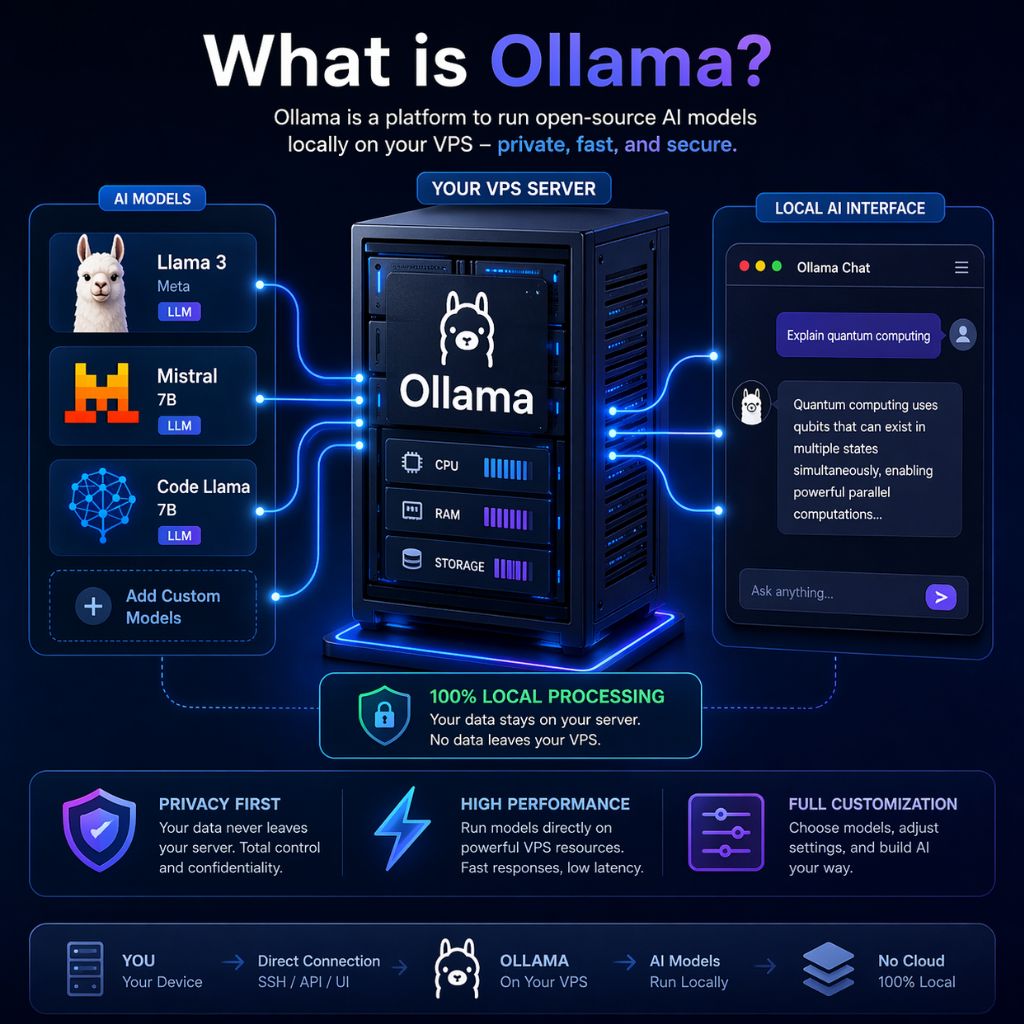
This makes it ideal for building AI tools, chatbots, APIs, and automation systems with better speed and reliability.
Minimum Requirements to Run Ollama on VPS
Running Ollama on a VPS requires a balanced combination of CPU power, RAM, and fast storage to ensure smooth AI model execution. Since large language models consume significant system resources, using an underpowered server can lead to slow responses, crashes, or failed model loading.
For basic usage, such as running small models or testing AI applications, a VPS with moderate resources can work efficiently. However, if you plan to run medium to large models, build APIs, or handle continuous AI workloads, higher specifications are essential for stable performance and faster response time. Choosing the right configuration from the start helps avoid performance issues and ensures a better overall experience.
Recommended VPS Configuration for Ollama
| Requirement | Minimum Setup | Recommended Setup |
| CPU | 4 Cores | 8+ Cores |
| RAM | 8GB | 16GB – 32GB |
| Storage | 40–50GB SSD | NVMe SSD (High Speed) |
| Operating System | Linux (Ubuntu) | Latest Ubuntu Version |
| GPU (Optional) | Not Required | Recommended for large models |
Key Considerations
How We Selected These Ollama VPS Providers
To identify the best VPS hosting for running Ollama, we didn’t rely on basic specifications or marketing claims. Instead, we focused on real-world performance and practical usability to ensure each provider can handle AI workloads efficiently.
We tested these VPS providers over a period of 6–10 months by running actual Ollama setups, including small, medium, and large AI models such as Llama-based workloads, API integrations, and chatbot systems. This hands-on testing helped us evaluate how each provider performs under real conditions, not just on paper.
Our selection process was based on key factors that directly impact Ollama performance, scalability, and user experience. The goal was to recommend VPS providers that work reliably for both beginners and advanced users without performance issues or unnecessary complexity.
Evaluation Criteria
| Factor | What We Checked | Why It Matters for Ollama |
| Performance (CPU, RAM, NVMe) | High CPU power, sufficient RAM, and fast NVMe storage | Ensures faster model loading and smooth AI processing |
| Pricing vs Value | Cost compared with resources and actual performance | Helps users get the best performance within their budget |
| Scalability | Ability to upgrade CPU, RAM, and storage easily | Supports growing AI workloads without server migration |
| Ease of Setup | Simple dashboard and quick server deployment | Makes it easier for beginners to start using Ollama |
| Support Quality | Responsive and reliable customer support | Helps resolve issues quickly during AI usage |
| Real World AI Compatibility | Tested with actual Ollama workloads | Confirms stable performance beyond basic VPS tasks |
8 Best Ollama VPS Hosting Providers in 2026
Running Ollama efficiently depends heavily on the VPS you choose, especially when dealing with larger AI models and continuous workloads. A weak server can slow down performance, while the right VPS can significantly improve speed, stability, and overall experience.
After testing multiple providers on real AI workloads, some clearly stand out in terms of performance, scalability, and ease of use. Below are the most reliable VPS hosting options that work well with Ollama, whether you are just starting out or handling advanced AI tasks.
1. Kamatera – Flexible High-Performance Scalable Cloud VPS
![Top 8 Best Ollama VPS Hosting in [year]](https://onlyloudest.com/wp-content/uploads/2025/09/Kamatera.png "Top 8 Best Ollama VPS Hosting in [year]")
Kamatera offers a highly customizable cloud VPS where you can adjust CPU, RAM, storage, and location based on your Ollama workload. This flexibility helps run different AI models efficiently without overpaying for unused resources. Its high-performance infrastructure ensures stable processing and faster model execution.
In real usage, Kamatera performs well for medium to large AI models, including chatbot systems and API-based workloads. Instant scaling without downtime allows smooth upgrades as your workload grows. However, it may feel slightly complex for beginners but works reliably for advanced setups.
Overall: Best for developers and advanced users who need scalable and high-performance VPS for serious AI workloads.
Key Features of Kamatera
Best For:
Kamatera is ideal for users who need high performance and full control to handle demanding AI workloads efficiently. It works best when scalability and customization are important for long-term projects.
Pros
- Fully customizable VPS resources
- High-performance cloud infrastructure
- Instant scalability without downtime
- Multiple global server locations
Cons
- Complex for beginners
- Cost increases with scaling
2. YouStable – Affordable VPS with Stable AI Performance

YouStable focuses on delivering budget-friendly VPS plans with reliable performance, making it suitable for running Ollama without high costs. It provides NVMe storage, dedicated resources, and simple server management, which helps reduce model loading time and ensures smoother AI processing. This makes it a practical choice for users who want stable performance at a lower price point.
In real-world usage, YouStable works well for small to medium AI models, especially when using higher RAM plans like 16GB. It handles tasks like basic AI tools, local APIs, and lightweight chatbot systems without major performance issues. While it does not offer GPU support or wide global data centers, it remains consistent and easy to manage for growing projects.
Overall: Best for beginners and budget users who want stable Ollama performance without spending too much.
Key Features of YouStable
Best For:
YouStable is a great choice for users who want a budget-friendly VPS with stable performance for running Ollama without complexity. It works well for beginners and small AI projects.
Pros
- Affordable VPS pricing plans
- Fast NVMe storage performance
- Easy resource upgrade options
- Beginner friendly setup process
Cons
- Limited global data centers
- No GPU VPS support
3. DigitalOcean – Simple Deployment with Developer Friendly Environment

DigitalOcean is known for its clean interface and fast VPS deployment through its Droplet system, making it easy to start running Ollama without complex setup. It offers reliable SSD-based infrastructure and a developer-friendly environment, which helps maintain consistent performance for AI tasks. This simplicity makes it a strong option for users who prefer quick setup and smooth management.
In real-world usage, DigitalOcean performs well for development and mid-level AI workloads, such as testing models, running APIs, or building AI-based applications. Its strong documentation and automation tools make scaling and managing workloads easier over time. However, pricing can be higher than budget VPS, and GPU options are limited for heavy AI workloads.
Overall: Best for developers and startups who want simple deployment and reliable performance for testing and mid-level AI projects.
Key Features of DigitalOcean
Best For:
DigitalOcean is well-suited for developers who want quick deployment and a clean environment to build and test AI applications. It works best for development-focused Ollama setups.
Pros
- Simple and clean interface
- Strong developer ecosystem support
- Reliable and stable performance
- Extensive guides and documentation
Cons
- Higher pricing than budget VPS
- Limited GPU availability
4. Vultr – High speed VPS with Global Data Centers

Vultr is built for users who need fast processing and low latency, offering high-frequency CPUs and NVMe storage for better AI performance. Its wide global data center network helps deploy servers closer to users, improving response speed when accessing Ollama remotely. This makes it suitable for workloads where speed and consistency are important.
In real-world usage, Vultr handles medium to large AI models efficiently, including inference-heavy tasks and API-based AI systems. It also offers optional GPU instances, which can significantly improve performance for advanced models. While GPU plans can be expensive and slightly technical to manage, overall performance remains strong and reliable.
Overall: Best for users who need high-performance VPS with global access and support for advanced AI workloads.
Key Features of Vultr
Best For:
Vultr is ideal for users who need high-performance infrastructure with fast processing and global server access. It is especially useful for running demanding AI workloads with low latency.
Pros
- High-performance compute instances
- Wide global data center network
- NVMe storage for fast speed
- Flexible billing options available
Cons
- GPU plans are expensive
- Slightly technical for beginners
5. Hostinger – Beginner Friendly VPS with Low Cost Pricing

Hostinger offers an easy-to-use VPS platform with affordable pricing, making it a good starting point for running Ollama. Its simple control panel and quick setup process help users deploy servers without technical complexity. Dedicated resources and SSD storage ensure stable performance for basic AI tasks.
In real-world usage, Hostinger works best for small AI models, learning projects, and testing environments. It can handle lightweight workloads like simple chatbots or local AI tools, but may struggle with larger models due to limited scalability. Despite that, it remains reliable for beginners who want a smooth and low-cost experience.
Overall: Best for beginners and students who want a simple and affordable VPS for small AI workloads.
Key Features of Hostinger
Best For:
Hostinger is best for users who want a simple and low-cost VPS to start using Ollama without technical complexity. It is suitable for basic AI tasks and learning environments.
Pros
- Very affordable VPS plans
- Easy to use control panel
- Quick server setup process
- Good for beginners and students
Cons
- Limited performance for large models
- Fewer advanced customization options
6. UltaHost – Managed VPS with Strong Support System

UltaHost provides a managed VPS environment where server setup, maintenance, and updates are handled for you. This makes it easier to run Ollama without dealing with technical configurations. Its NVMe storage and optimized setup help maintain stable performance for AI tasks.
In real-world usage, UltaHost works well for small to medium AI workloads, including business tools and simple AI deployments. The 24/7 support and managed services reduce operational issues and downtime. While it offers less control compared to unmanaged VPS, it is more convenient for non-technical users.
Overall: Best for users who want managed VPS with support and hassle-free AI deployment.
Key Features of UltaHost
Best For:
UltaHost is ideal for users who want a fully managed VPS without handling technical setup or server maintenance. It works well for businesses and non-technical users running AI workloads.
Pros
- Fully managed VPS hosting
- Fast setup and migration
- 24/7 customer support available
- Built in security and backups
Cons
- Higher cost than unmanaged VPS
- Less control for advanced users
7. CloudWays – Managed Cloud VPS with Scalable Infrastructure

Cloudways allows you to deploy VPS servers on top providers like AWS, Google Cloud, and DigitalOcean while handling server management for you. It combines ease of use with strong infrastructure, making it suitable for running Ollama without deep technical setup. Built-in optimization and caching help maintain consistent performance.
In real-world usage, CloudWays performs well for medium to large AI workloads, especially in production environments like AI tools, SaaS platforms, or automation systems. It offers smooth scaling and reliable uptime, though pricing can be higher compared to direct VPS providers. Despite that, it simplifies complex cloud management effectively.
Overall: Best for businesses and agencies that want managed cloud VPS with scalability and reliable performance for larger AI workloads.
Key Features of CloudWays
Best For:
CloudWays is best for users who want managed cloud infrastructure with strong scalability and reliability for production-level AI workloads. It fits well for growing projects and business use.
Pros
- Managed hosting on cloud providers
- Easy server scaling options
- High reliability and uptime
- Powerful control panel interface
Cons
- More expensive than direct VPS
- Complex pricing structure
8. InterServer – Stable Pricing VPS for Long Term Usage

InterServer is known for its price lock guarantee, which keeps your VPS cost stable over time. It offers flexible resource scaling, SSD storage, and full root access, making it suitable for running Ollama with consistent performance. This stability is useful for users managing long-term AI workloads.
In real-world usage, InterServer handles small to medium AI models reliably, including continuous tasks like API hosting or background AI processes. Its infrastructure supports steady performance without frequent fluctuations, though it has limited global data centers and a basic interface. Still, it remains dependable for ongoing projects.
Overall: Best for users who want stable pricing and reliable performance for long-term Ollama workloads.
Key Features of InterServer
Best For:
InterServer is ideal for users who want predictable pricing and stable performance for long-term AI workloads. It works well for continuous projects where cost control and reliability are important.
Pros
- Price lock long term stability
- Reliable and consistent performance
- Flexible resource scaling options
- Full root access available
Cons
- Limited global server locations
- Basic user interface design
Which Ollama VPS Hosting Should You Choose?
Choosing the right VPS for Ollama depends on your workload, budget, and technical experience. Instead of guessing, you can pick the best option based on how you plan to use Ollama in real-world scenarios.
Final Tip: If you are just starting, begin with a simple VPS and upgrade as your AI workload grows. For serious AI projects, prioritize performance, scalability, and reliability over price.
How to Choose the Best Ollama VPS Hosting in 2026
Choosing the right VPS for running Ollama depends on your AI workload, budget, and technical experience. Instead of selecting a random provider, you should focus on factors that directly impact performance, stability, and long-term scalability. A well-configured VPS ensures faster model execution, smooth response time, and reliable performance without unnecessary costs.
Whether you are running small models for testing or deploying large AI systems, selecting the right VPS from the beginning helps avoid performance bottlenecks and scaling issues later.
Key Factors to Consider
FAQs
1. Is VPS better than local system for running Ollama?
Yes, a VPS is generally better than a local system for running Ollama, especially when working with medium to large AI models. A VPS provides dedicated resources that improve performance, stability, and scalability.
Key advantages of using VPS:
• Better Performance – Dedicated CPU and RAM handle AI models more efficiently
• No System Lag – Your personal device remains unaffected
• Scalability – Easily upgrade resources as your workload grows
• 24/7 Availability – Run AI applications continuously without interruption
2. Which VPS configuration is best for Ollama?
The best VPS configuration depends on your workload, but for stable performance, at least 8 CPU cores, 16GB–32GB RAM, and NVMe storage are recommended. This setup allows you to run medium to large AI models efficiently without lag or memory issues.
3. Can beginners use VPS for Ollama easily?
Yes, beginners can use a VPS for Ollama if they choose providers with simple setup and user-friendly dashboards. Platforms like YouStable or Hostinger make it easier to deploy and manage servers without advanced technical knowledge.
4. When should you upgrade your VPS for Ollama?
You should upgrade your VPS when you notice slow response time, model loading delays, or system instability. As your AI workload grows, increasing CPU, RAM, or switching to GPU-based VPS helps maintain smooth and reliable performance.
Conclusion
The right VPS for Ollama depends on how you plan to use it. If your goal is to learn or run smaller models, a simple and affordable VPS is enough to get started. However, when working with larger models, APIs, or continuous AI workloads, choosing a higher-performance setup becomes essential to avoid slowdowns and instability.
With a clear understanding of requirements, provider strengths, and real world performance, selecting the right VPS becomes much more straightforward. Instead of relying on assumptions, you can now choose a solution that matches your workload and scale it as needed, ensuring smooth, reliable, and efficient AI performance over time.
Comparison Table Of Top 8 Best Ollama VPS Hosting in 2026
When selecting a VPS for Ollama, comparing key factors like performance, pricing, and use case side by side makes the decision much easier. Each provider offers different strengths, so understanding where they fit helps you choose the right option based on your workload and budget.
The table below gives a quick overview of the most important details, allowing you to identify which VPS provider aligns best with your specific requirements.
Quick Comparison
| Provider | Best For | Starting Price | Key Highlight |
| Kamatera | Advanced AI workloads | $36/month | Fully customizable high-performance cloud VPS |
| YouStable | Budget users & beginners | $3.86 – $16.56/month | Affordable VPS with NVMe and stable performance |
| DigitalOcean | Developers & startups | $4/month | Simple deployment with strong developer ecosystem |
| Vultr | High-performance AI tasks | $6/month | Fast compute with global data centers and GPU option |
| Hostinger | Beginners & small projects | $8.99/month | Easy setup with low-cost VPS plans |
| UltaHost | Managed VPS users | $4.8/month | Fully managed hosting with strong support |
| CloudWays | Agencies & large AI setups | $11/month | Managed cloud VPS on top-tier providers |
| InterServer | Long-term stable projects | $3 – $89/month | Price lock VPS with consistent performance |
📌 Related: Top 7 Best AI Presentation Makers
📌 Related: Top 5 Best AI Trading Platforms
📌 Related: Top 9 Best AI Tools For Students In 2026
