
Order Hosting From AbeloHost Easy Step-by-Step Guide 2026
Estimated reading time: 8 minutes, 35 secondsLast updated on August 8th, 2026 at 12:07 pm
Are you on this page after visiting numerous websites to learn how to Order Hosting From AbeloHost and take advantage of its offshore hosting solutions? Are you new to AbeloHost and have no idea where to start? If your answer to these questions is an overwhelming YES, don’t worry we’ve got you covered.
This guide will explain the simplest way to Order Hosting From AbeloHost, including Offshore Web Hosting, Offshore VPS, and Offshore Dedicated Servers. We’ll also discuss the activation process and how long it may take for your hosting service to become active after you place your order and complete the payment.
AbeloHost offers offshore web hosting, offshore VPS, and offshore dedicated servers, along with additional services such as website migration, server colocation, and anti-DDoS protection.
What is the Hosting Package of AbeloHost?
For our readers’ suitability, we have provided a tabular comparison of the hosting services with its monthly price enabling them to make their choice before moving ahead with the ordering process. So, the hosting packages of Abelohost are listed as under:
Offshore Web Hosting(cPanel included)
Simple Bloggers & Small Businesses having a meager website requirements can go for Offshore Web hosting plans offered by Abelohost. Their plans include a cPanel and has a one click Application installer feature as well making it more user-friendly.
| Plan | Bandwidth | Dedicated IP | SSD Storage | Subdomains | MySQL Databases | Monthly Price |
| SafeWeb | 50 GB | IPv4 | 10 GB SSD | 10 | 10 | €6.99/mo |
| SecureWeb | 120 GB | IPv4 | 20 GB SSD | 20 | 20 | €9.99/mo |
| FortifiedWeb | 350 GB | IPv4 | 40 GB SSD | 40 | 40 | €16.99/mo |
| ProWeb | 1000 GB | IPv4 | 80 GB SSD | 70 | 80 | €24.99/mo |
Offshore VPS Hosting
Offshore VPS hosting services are available for you to cater the greater needs of your websites and to welcome increased traffic in your site as well. Offshore VPS comes with reliable, dependable and powerful features.
| Plan | RAM | CPU Cores | CPU Speed | SSD Storage | IP Address | Traffic | Price/Month |
| SafeVPS | 1 GB | 1 Core | 2.40 GHz | 15 GB SSD | 1 IP | Unmetered | €9.99 |
| SecureVPS | 2 GB | 2 Cores | 2.40 GHz | 25 GB SSD | 1 IP | Unmetered | €19.99 |
| FortifiedVPS | 4 GB | 2 Cores | 2.40 GHz | 50 GB SSD | 1 IP | Unmetered | €29.99 |
| ProVPS | 8 GB | 4 Cores | 2.40 GHz | 120 GB SSD | 1 IP | Unmetered | €39.99 |
Managed Offshore Dedicated server Hosting
If you are having a media rich website and very high traffic, you can go with Manage offshore Dedicated server Hosting services providing maximum power, security and speed to the users needing offshore Dedicated server hosting.
| Plans and Features | CPU series | RAM | Bandwidth | Price per Month |
|---|---|---|---|---|
| Intel Xeon E3-1230v2 | 4 Cores, 3.30 GHz | 16GB DDR4 ECC | 100 TB | €131.99 |
| 2 x Intel Xeon E5-2620v4 | 16 Cores, 2.10 GHz | 32GB DDR3 ECC | 100 TB | €398.99 |
Having that said, let’s now move deeper into the methodological way in which one can order web hosting services from Abelohost effortlessly. Keep reading this post further to know more creamy details about it.
How to Order Offshore Web Hosting in AbeloHost?
Did you find Offshore Web hosting services, with the attractive plans and its related unbeatable prices being discussed earlier in this article, fruitfully sufficient for your website needs? If yes then let’s make the ordering process of offshore web hosting services from Abelohost easy for you.
To order Offshore Web Hosting from Abelohost, follow the instructions provided as under:

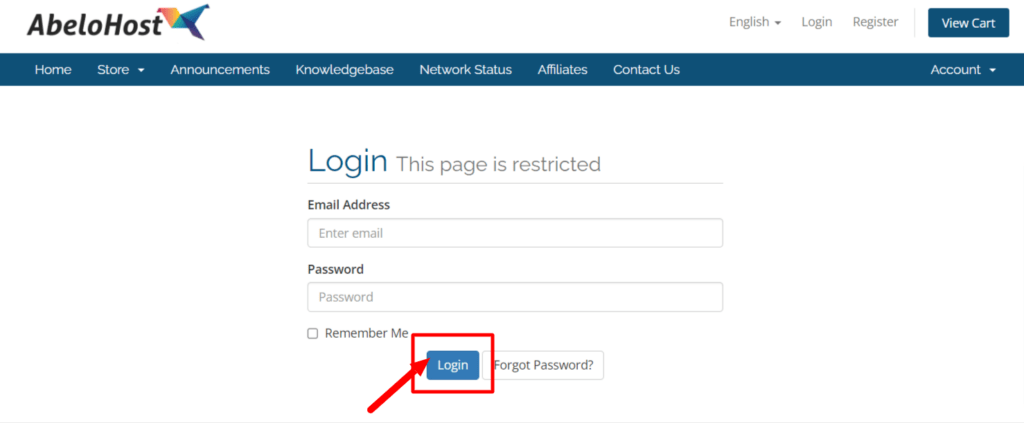
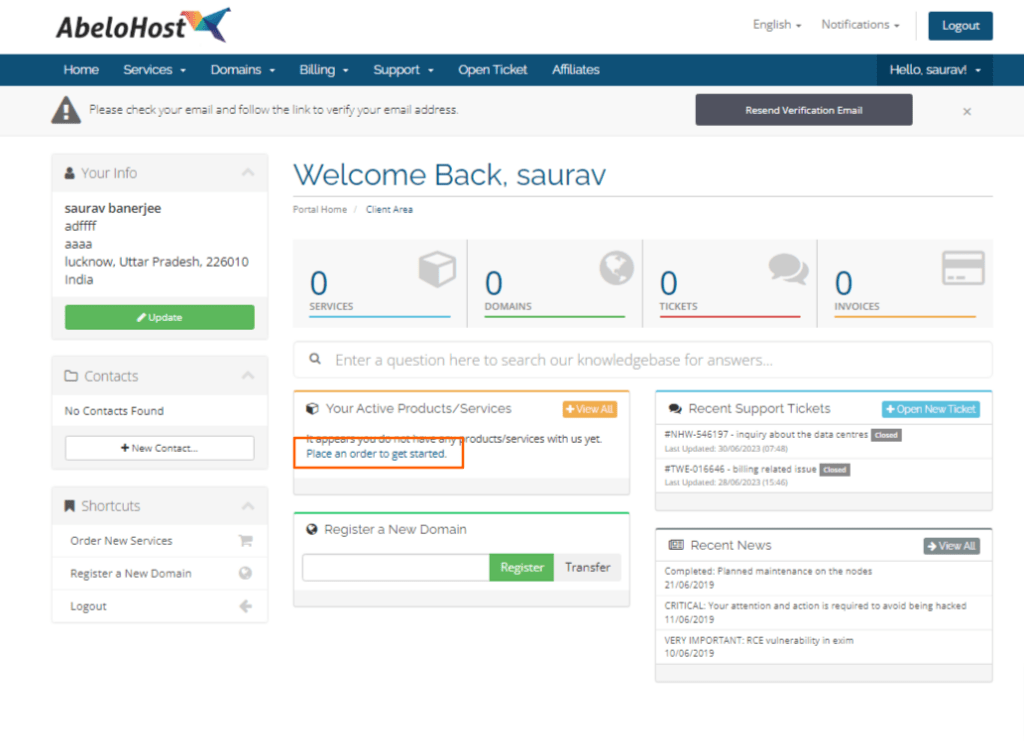
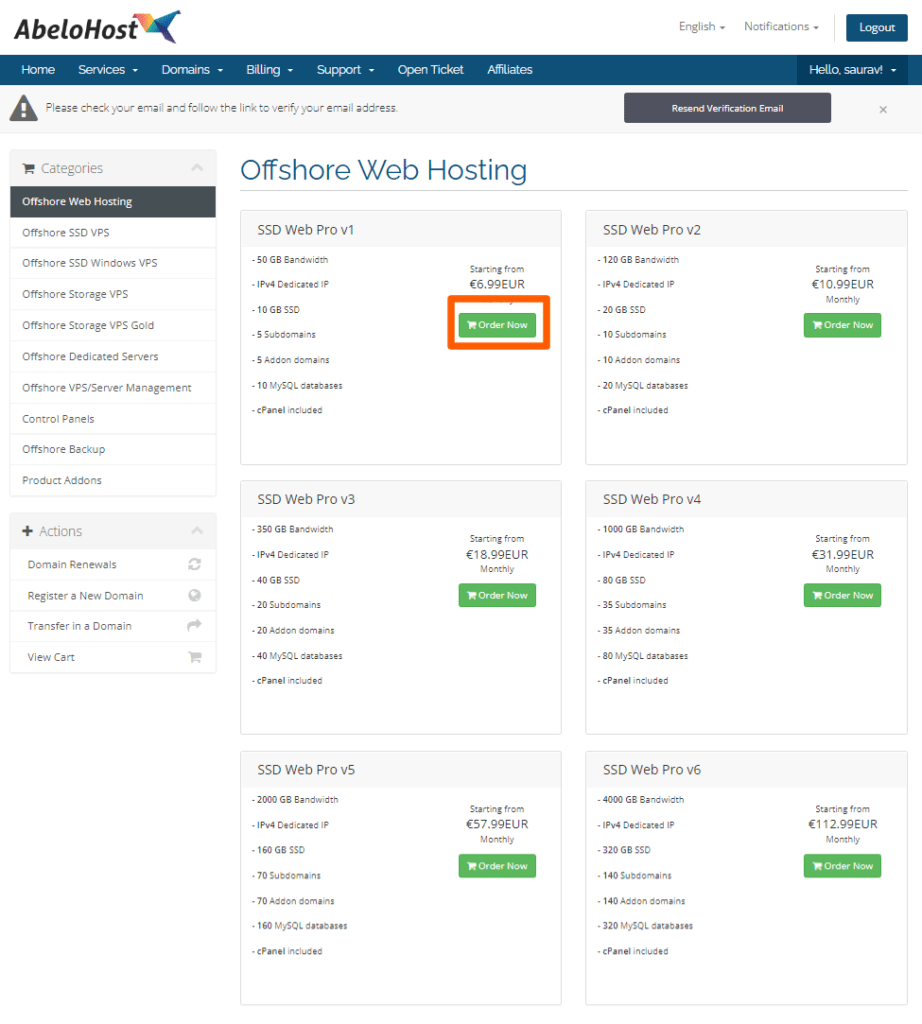
![Order Hosting From AbeloHost Easy Step-by-Step Guide [year]](https://googiehost.com/blog/wp-content/uploads/hlg-legacy/2023/09/Choose-AbeloHost-Domain-1024x718.png "Order Hosting From AbeloHost Easy Step-by-Step Guide [year]")
![Order Hosting From AbeloHost Easy Step-by-Step Guide [year]](https://googiehost.com/blog/wp-content/uploads/hlg-legacy/2023/09/Abelohost-payement-option-1024x1005.png "Order Hosting From AbeloHost Easy Step-by-Step Guide [year]")
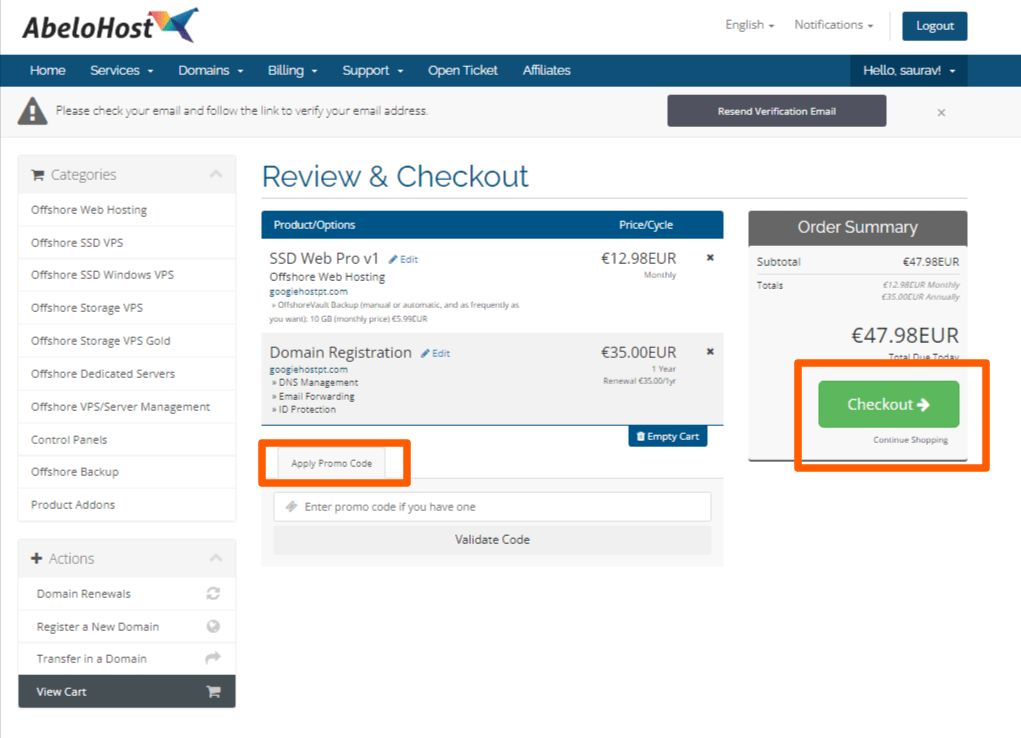
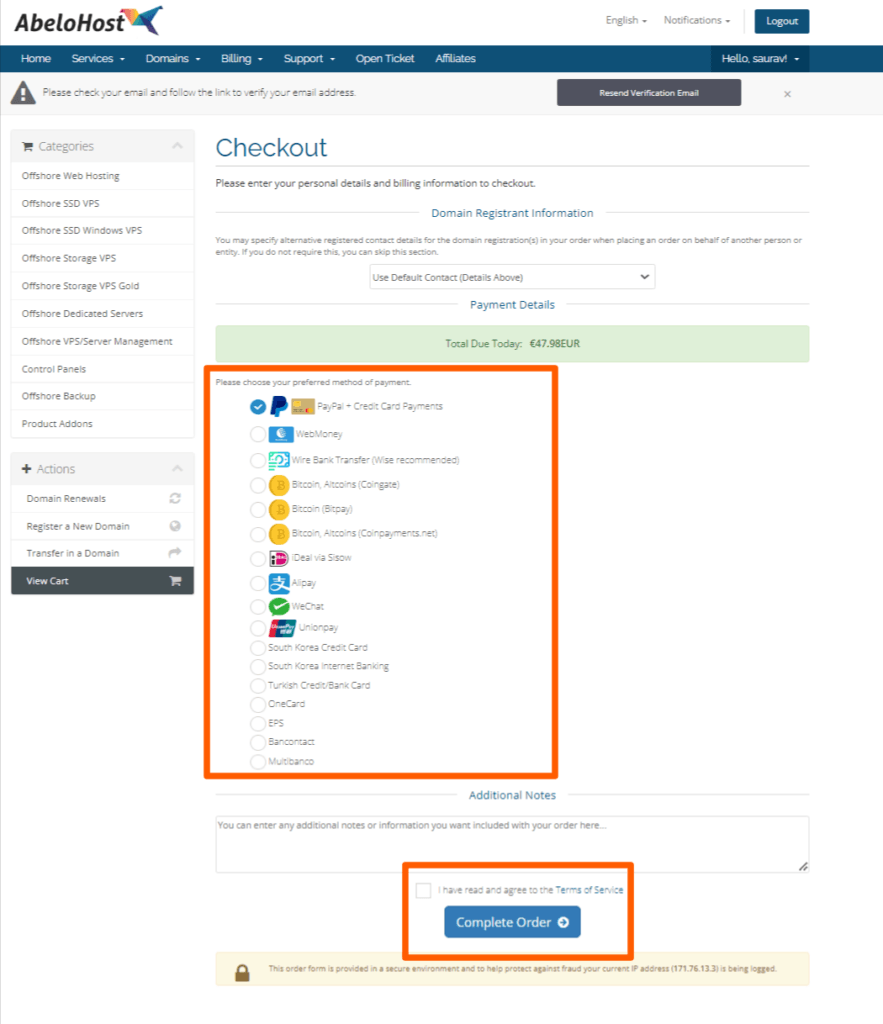
To grab more information about the activation period order, Keep reading the article! 👍
How to Order Offshore VPS Hosting in AbeloHost?
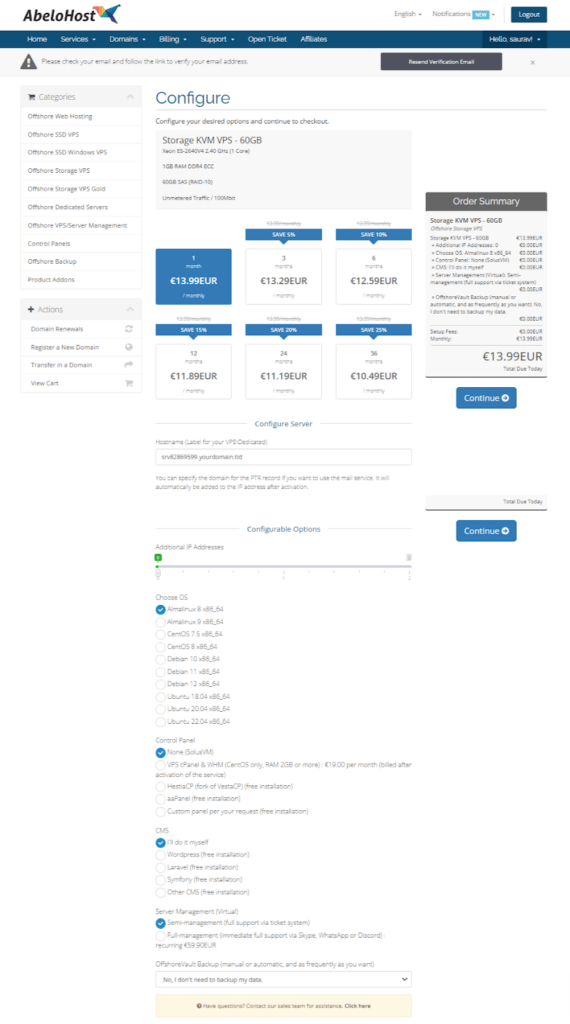
Now since we have discussed the procedure to make an order for Web hosting services, exactly the same ordering procedure is to be followed for ordering Offshore VPS and Managed Offshore Dedicated server hosting services from Abelohost.
The Procedure to order the Offshore VPS Hosting services from Abelohost are as follows:
How To Order a Managed Offshore Dedicated Server?
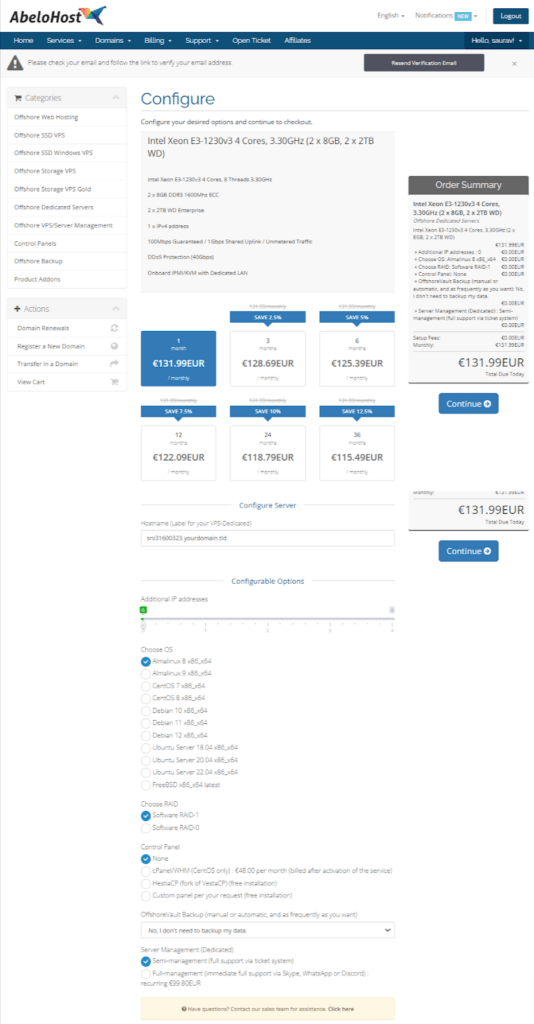
After learning the stepwise instructions to order offshore Web & offshore VPS Hosting, the ordering process of Managed offshore Dedicated server hosting services from Abelohost is somewhat the same too.
Lets hop and look at the ordering process mentioned as under:
👉 If Also you want to know about the Full Guide: How to Order Hosting from A2 Hosting Package.
How much time does Abelohost take to activate my order?
Usually, after the payment for the hosting service is made, the next thing that the users are worried about is the activation period of the hosting service.
We had a golden opportunity to establish contact with the Abelohost support team via Live chat about the Activation period of the order of all the hosting services(Offshore Web, VPS and Dedicated server).
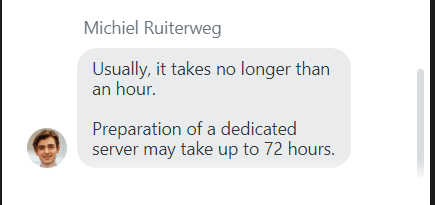
A friendly conversation with an expert agent enabled us to know that Offshore Web hosting services & Offshore VPS hosting services get activated immediately, soon after the payment is made. Whereas, the Offshore Dedicated server hosting service takes upto 72 hours (3 days) to get activated due to prolonged configuration required to set up the dedicated server.
Soon after activation, users having an existing Domain registered with another hosting provider can easily point the Abelohost nameservers to the domain.
👉 If Also you want to know about the How To Access Client Area in BlueAngelHost Login.
FAQ
Few related doubts that readers do usually enquire about when ordering offshore hosting services from Abelohost, are as follows:
How To Check AbeloHost VPS Usage?
There is an easy route that users need to take to check the VPS usage in Abelohost. It is mentioned as under:rn By logging into your Abelohost account, the dashboard shows the VPS usage under the VPS information tab > Overview tab.
Does AbeloHost Provide Reseller Hosting?
We are afraid to say but it’s a NO! If a user wants to set up a web hosting service provider business of his own, then he needs to reach out to some other Web Hosting service providers like HostPapa, ScalaHosting, Liquid Web and a lot more rather than seeking to get hosting from Abelohost, as they do not provide Reseller hosting services to its clients.
Does AbeloHost Offer a Free Domain?
The answer is negative. Abelohost doesn’t offer a free domain to the users who are new in creating a website. However, With a minimum cost, Abelohost provides 24/7 customer care services, Quick Setup, One click installation and a lot more easy configuration, making your website building experience a success. For more information you can get in touch with the Review page of Abelohost helping you know the minute details about Abelohosting.
Conclusion
We believe that this article has provided you with the effortless ways of ordering web hosting plan from Abelohost. And in the event of any problem, you can easily contact the support team that is available 24/7 at your disposal as is mentioned in the reviews of Abelohost.
We will be required to implement your intelligent recommendations, which we wholeheartedly support.
Abelohost is one of the best offshore hosting providers and has a great team behind its success in Offshore Web Hosting. When using their services, if you come up with any queries, you can always open a ticket with your personal details and the queries you have.
Here is the website of Abelohost.com. You see their services and products and using this Abelohost, you can create an account.
📌 Related: AbeloHost Login
📌 Related: WP Engine Login
