
AbeloHost NameServers How to Point a Domain to AbeloHost
Estimated reading time: 5 minutes, 30 secondsLast updated on August 10th, 2026 at 11:09 am
Enjoying your hosting services from Abelohost not knowing how to make configuration-related changes to Abelohost nameservers? Or don’t know who to approach when troubles by the problems involved in setting up Abelohost nameservers?
Stop thinking over such issues and scroll down to know how smartly you’ll be able to not only find the Abelohost nameservers but also point the Abelohost nameservers to your existing domain to let your customer access you without any network issues.
We will also be discussing an amazing Whois checker tool provided by none other than Onlyloudest. Enabling you to verify the updated nameservers for smooth functioning of your website.
So without keeping you on hold, let’s move forward with the creamy information about Abelohost Nameservers.
AbeloHost Nameservers
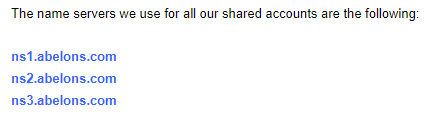
For users’ comfort, we have tabled the Abelohost nameservers to save them from spending time in locating the Abelohost nameservers. The nameservers are as follows.
ns1.abelons.com
ns2.abelons.com
ns3.abelons.com
What are Nameservers and how do they work?
To put it in simple words, Nameservers are the most important part of the DNS(Domain Name System). They translate the Domain names that are written in human-friendly language into numeric-coded IP addresses that computers use to communicate with each other.
Nameservers play a very crucial role in ensuring that when you enter a domain name, your device can locate the correct IP address associated with that domain. The nameservers facilitate smooth navigation and accessibility of websites, email servers, and other internet services by translating user-friendly domain names into machine-readable IP addresses.
How to find AbeloHost Nameservers?
If you are trying to locate the nameservers of Abelohost, you need to follow the step-wise instructions given as under:
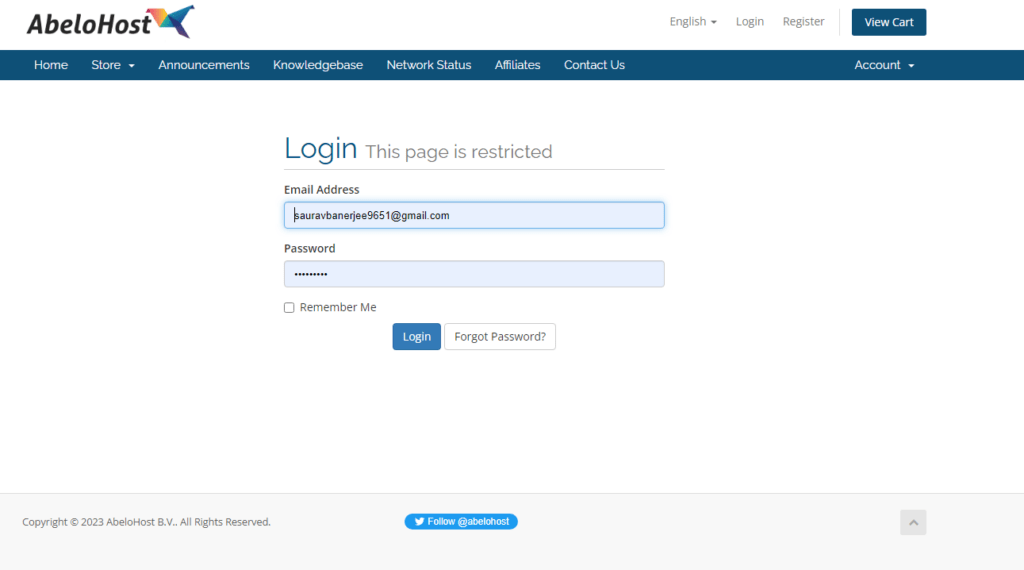
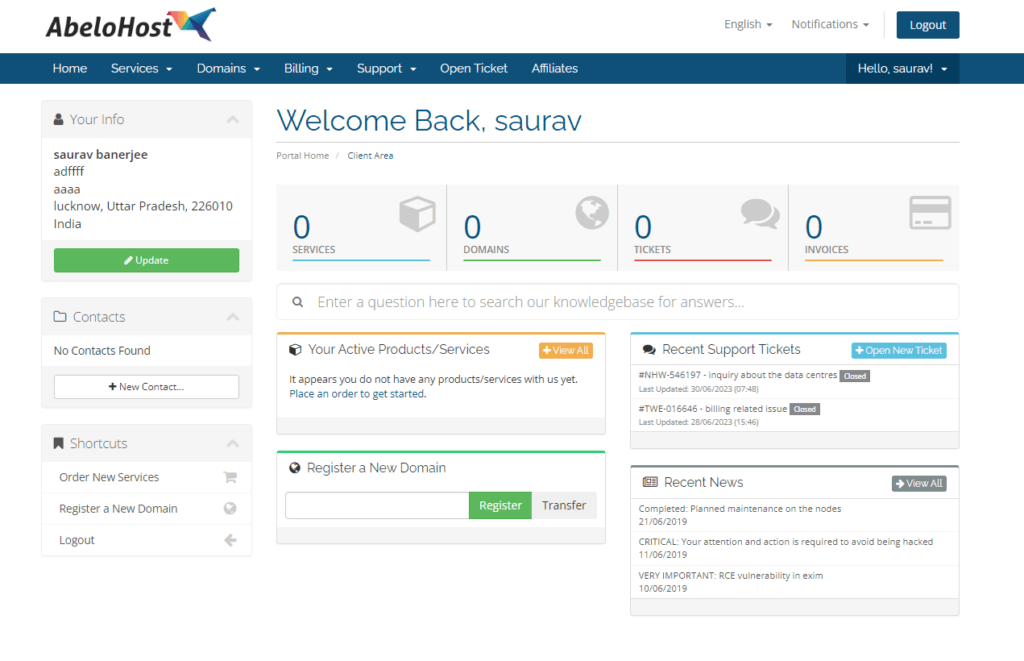
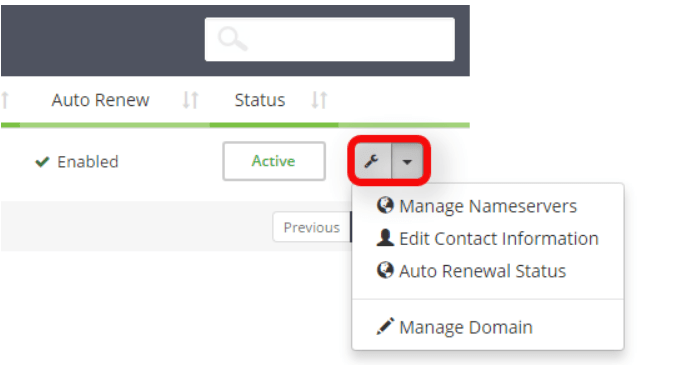
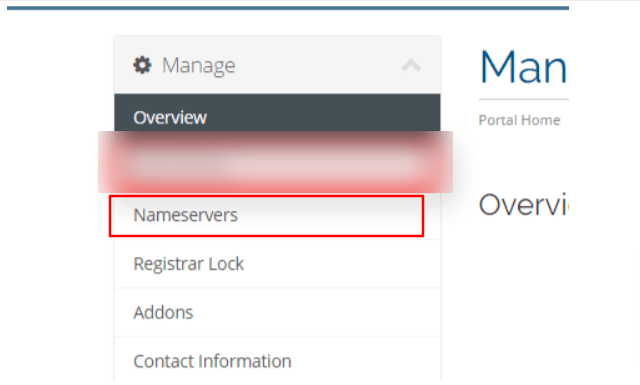
Now if you are a new user and are buying a new domain name with Abelohost, your domain name automatically uses the nameservers of Abelohost by default.
But if you already have a domain name registered with a hosting service provider other than Abelohost, then you need to point the Abelohost nameservers or use a custom nameserver to your existing Domain name.
So, after knowing the nameservers of Abelohost, you can point these nameservers to your existing domain that is registered with another Hosting service provider. To point the nameservers to your domain, keep reading the article further. 👍
How do I point to the AbeloHost NameServers in my domain?
Reading the page, we got to know the method to locate the nameserevers of Abelohost. Now let’s see how a user can easily point the Abelohost nameservers to their domain.
On pressing the save button, the nameservers of your domain get configured accordingly. Now users might be trying hard to find out if the nameservers of their domain got updated. To this, we have mentioned an interesting way out as you keep reading the page further.
How do I check and verify my updated NameServers?
Checking and verifying the status of the updated nameservers is very crucial to know before your clients encounter serious navigation troubles while accessing the information on your website.
So, to this problem comes a fantastic, user-friendly, free-of-cost onlyloudest whois checker tool. Using this tool, one can easily check and verify the status of the nameservers and other related information as well. The big question now lies in front of us: How to use it?
Sometimes, numerous DNS problems can be caused by incorrect nameserver records. It is possible to check the DNS status of a Domain using web-based tools. Further, as you scroll, we’ll see potential errors as well as how to fix them.
How to Troubleshoot Nameserver Errors
On the shared servers of Abelohost, 4 nameserver records are preconfigured for newly created accounts and newly registered domains. At times, the DNS checker will flag the issue if the nameserver records at the registrar do not include all 4 records.
Now, how to fix this issue?
To correct the error, simply add the missing nameserver to the registrar record.
What if some grave issue concerning nameservers pops up? What are you supposed to do in such a situation? Read further to get more details about it:
How to contact AbeloHost Support if my NameServers Are not working?
What if you are unable to locate the nameservers of Abelohost and are troubled by consistent errors while trying to configure the nameservers of Abelohost even after following the instructions provided above from your dashboard? It is a good choice to approach the Abelohost support service directly through:
On facing difficulties in locating the nameservers in your Abelohost account, we would suggest you approach the incredible Abelohost support services for further customer assistance, as per the positive reviews of Abelohost. The support channels of Abelohost will provide you with exact information and specific instructions framed to your account.
Conclusion
The pics and related facts given in this article will definitely be more than enough for you to help you configure Abelohost nameserver-related issues. The information stated is user-friendly, and we sincerely hope that you not only enjoyed going through the post but also got to have a good idea about what nameservers are, how they work & procedures to configure nameservers as well.
Approach us by posting valuable comments on our article in case you want to suggest that we make more tech-related, navigable posts for you.
📌 Related: Order Hosting From AbeloHost
📌 Related: AbeloHost Login
