
ScalaCube NameServers: How to Point a Domain to ScalaCube
Estimated reading time: 4 minutes, 42 secondsLast updated on July 30th, 2026 at 10:58 am
ScalaCube nameservers are the first and foremost thing that a user attaching an existing domain to the game server should change once he orders hosting from ScalaCube. But due to unawareness about the technicalities involved in hosting packages, a new user is unable to do so.
If you are one of the above-mentioned new users trying to seek a solution to configure the Scalacube nameservers, then you have made a fair decision by clicking your way through to this page.
Besides Scalacube nameservers, user-friendly techniques to verify the updated nameservers will also be discussed in the article. Let’s take the talks ahead 👍
How to find ScalaCube NameServers?
Nameservers are part of the domain name system, which translates the human-friendly domain name to a machine-friendly IP address. Nameserver servers are important to configure when changing the hosting service from one provider to another to help your customers locate your web files easily.
Therefore, to find Scalacube nameservers, you are required to follow the instructions as given under.


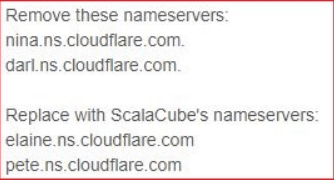
What if you have an existing domain, then what to do in that case? You need to first replace your previous nameservers with the new ones and then point the same to your existing domain. Now, to know about it, keep scrolling further to read.
How do I point to the ScalaCube NameServer in my domain?
Pointing the nameservers of your existing provider to your already existing domain is important to get access to various web files and make necessary configuration related to your data. So to manage your nameservers the following procedure is followed.



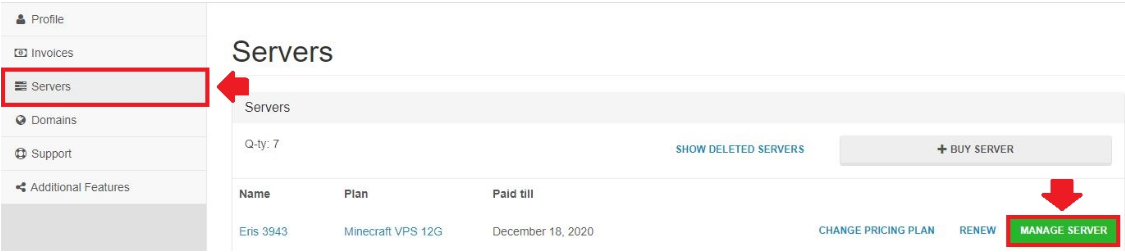
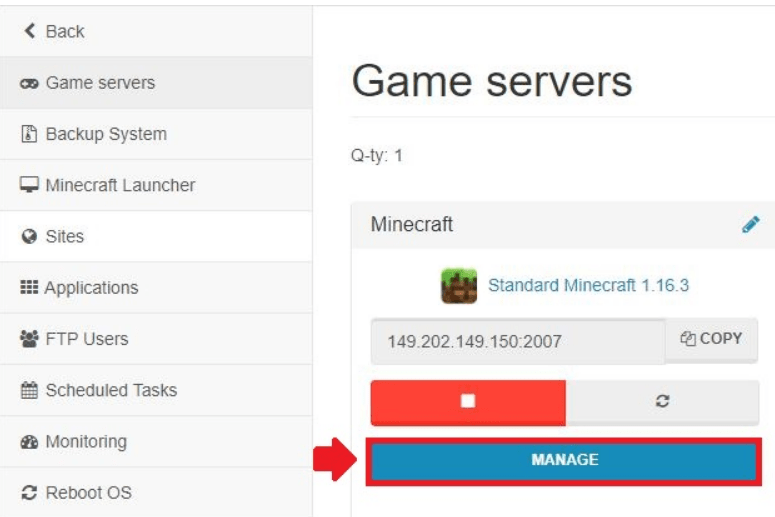
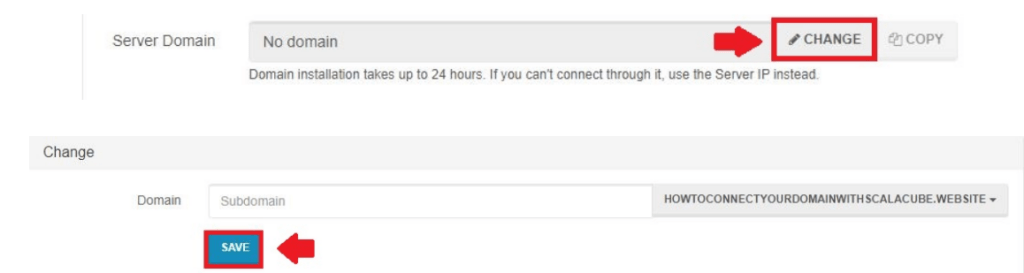
How do I check and verify my updated NameServers?
The most user friendly way to check status of the updated nameservers is by using whois checker tool, the most amazing to use being,onlyloudest whois checker tool. It is responsive and user friendly too. The tool is used in the following manner:

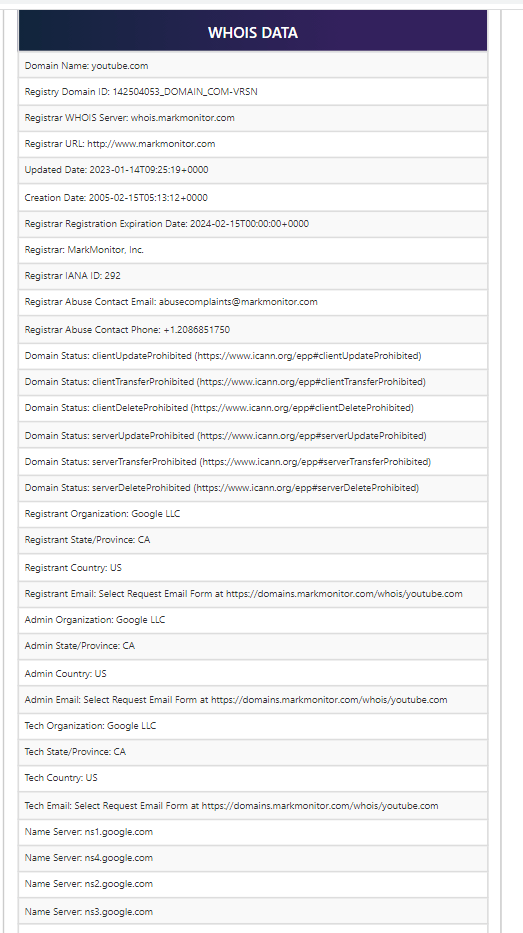
Using onlyloudest’s whois checker tool, you can easily, with no complex configuration, verify the status of your updated nameserver. In case of any issue feel free to contact the support team of onlyloudest by mailing at admin@onlyloudest.com
How to contact ScalaCube Support if my NameServers Are not working?
At times it happens that even after putting a lot of effort to configure nameservers, they fail to get updated or the user finds it difficult in even locating them as well. In that case, contacting the support team of Scalacube remains the best option for redemption. So for this case, contacting Scalacube support team can be made easy via:
1. Live chat
2. Ticket system
Conclusion
Nameservers are the important component of your DNS and you need to revise it once you change your hosting provider in case you already have a domain. In this article we learnt not only how to find the Scalacube nameservers but also help you understand how to point the custom nameservers to your domain and finally attach it with your game servers.
We also made you aware to use the Scalacube support option if your efforts applied to configure nameservers prove no worth.
We do hope that this article enlightened you with some of the necessary specifics related to the nameservers of your domain. If you sense so, then like and leave a valuable comment to motivate us to make more tech-related articles for our potential readers.
📌 Related: Hostodo Login
📌 Related: HostDare Login
