
MochaHost Nameservers: Point a Domain Easily 2026
Estimated reading time: 5 minutes, 3 secondsLast updated on August 1st, 2026 at 01:39 pm
This is a guide to give you some details regarding the MochaHost Nameservers web hosting company. If you want to host your website online, then MochaHost is one of the best options that you can choose, as they provide great offers and discounts to clients.
Moreover, their services are of high standards and help bring your business forward by keeping the website live all the time.
What is MochaHost?
With 23 years of experience in web hosting, MochaHost is a company that offers lifetime discounts for its clients. Great technical MochaHost customer support is offered to the client, which is available 24*7. With MochaHost,
you can register a domain and make use of the free website builder to create your website, or you can also choose one from their custom design packages. More details regarding MochaHost Nameservers, domains, etc. are given below for you to get an idea.
How Do I Find Nameservers?
After you register your domain with MochaHost, nameservers can be set according to your choice. You will receive an email from MochaHost upon the registration of your domain, and the email will include details related to the host and MochaHost nameservers.
You can also find your nameserver by logging in to your MochaHost Client Area. You must select the Domain tab and select the name of the domain to see the nameservers. Click on the Manage button, and under DNS management, you can see the nameservers.
How To Change My DNS Servers?
If you have registered your domain with MochaHost Nameservers or have transferred your domain to MochaHost, then follow the guidelines given below to change your DNS servers.
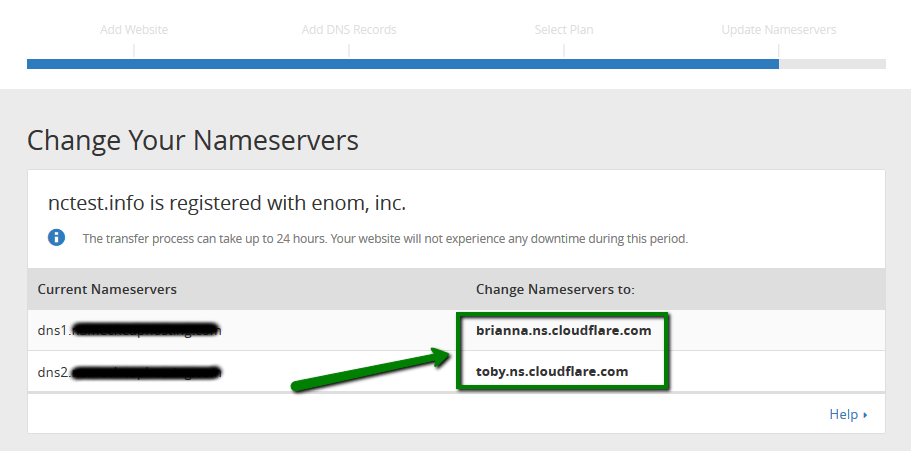
How to Update Your Nameservers to Mochahost
In this section, you will find details regarding how you can point an existing domain to Mochahost and host your website through Mochahost.
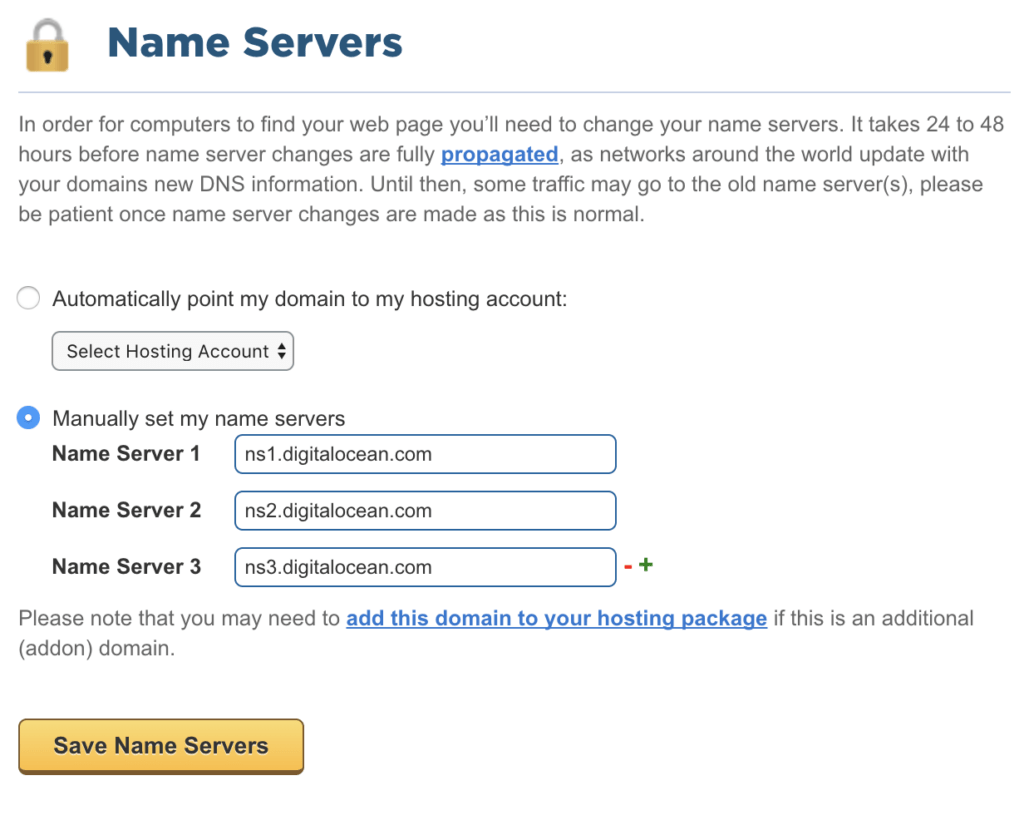
How Do I Add a Domain To Mochahost?
If your domain is registered with another host and you want to add that domain to Mochahost, then you should use the transfer option available. But you must check the requirements to transfer the domain to Mochahost Nameservers. Make sure that the domain name is at least 60 days old.
The domain must be active. Moreover, EPP authorization keys will be needed to transfer the domain with extensions like .com, .net, .org, .info, .biz, .bz, .us, .com.cn, .net.cn, .org.cn, .cn, .kids.us, .com.tw, .org.tw, .idv.tw, .in, .co.in, .net.in, .org.in, .firm.in, .gen.in, .ind.in, and .jobs names.
Get the authorization key from your current registrar, and when the transfer request is received by Mochahost, a verification email will be sent to the registrant and the admin. For more details, you can click on this link and learn more.
How To Check DNS Server And Mail Servers?
MochaHost provides a Mochahost webmail feature accessible from Linux shared plans, and you can get the details at this link: http://webmail.yourdomain.com/ or http://www.yourdomain.com/webmail/.
For Windows shared plans, you can use the link: http://webmail.yourdomain.com/. In order to check the DNS server, you can either check your welcome email that has details related to the domain and nameserver or you can get the details from your control panel under the DNS management section.
How Do I Transfer My Site To MochaHost?
MochaHost offers Free Migration from any provider that uses cPanel. Follow the steps given here to transfer your site to MochaHost.
FAQ
Is MochaHost free?
You can avail yourself of a free domain name and server setup with MochaHost.
Is MochaHost good?
Of course, MochaHost is a great company based in the US and it offers different web hosting plans that can meet your requirements.
How long does it take for MochaHost nameservers to update?
DNS propagation usually takes 24 to 48 hours. However, many domains begin resolving within a few hours depending on the registrar and ISP.
Can I use third-party nameservers with MochaHost?
Yes. If you use services like Cloudflare or another DNS provider, you can keep those nameservers while pointing DNS records to your MochaHost hosting account.
Will changing nameservers affect my website?
configured correctly, your website or email may become temporarily unavailable until DNS propagation is complete.
Conclusion
By using MochaHost, you can use many services and products necessary to enhance traffic to your business website.
Setting up your MochaHost nameservers is the final bridge between your domain and a high-performance website. With 19 years of industry experience and a commitment to 24/7 support, MochaHost makes the technical transition, whether it’s a new registration or a site migration, straightforward and reliable.
By following the steps outlined above, you ensure that your business stays online with the speed and stability it deserves. If you’re ready to scale your online presence, MochaHost’s lifetime discounts and free migration services provide the perfect starting point.
You can also find MochaHost video tutorials on their website to give you a clear understanding of various procedures. Learn more about MochaHost services by visiting the website.
📌 Related: TheOnionHost Login
📌 Related: Fast2Host Login
