
10 Best Free Construction Scheduling Software in 2026
Estimated reading time: 15 minutes, 1 secondLast updated on July 28th, 2026 at 09:32 am
Are you a contractor or manager desiring to finish off all the construction activities within time? Want to make better decisions on the basis of fixed time and date of construction? Looking for software that can help you scheduling and tracking construction activities for free?
If yes, then you have arrived on the right page as we’ll be exploring and discussing what exactly a construction scheduling software is, the 10 best free construction scheduling software and the key features that we can look for in the free construction scheduling software.
So, let’s get started with the post without any further delay.
What is free construction scheduling software?
The free construction scheduling software helps you to plan, track, schedule and fix time and date of completion or for a specific task in various construction activities for free with the help of which you can complete even the complex projects and teams while examining safety issues, equipment use and more.
Short of time? Here are the 5 best free construction scheduling software for you in the tabular form:
| Free Construction Scheduling Software | About (Specifications) | Plans and Price |
| Wrike | Integrate tools, collaborate and drive efficiency, project and task management, AI content generation, Board view, mobile and desktop apps. | Free at $0/user/month14-day free trial available for premium plans |
| Fieldwire | Track performance, reduce risk, coordinate efficiently, plan viewing, files and photos, checklists, task management, plan for a small team. | Free Basic plan at $0/user/month. |
| Workiz | Scheduling, online booking + checkout, mobile apps, 20 invoices, jobs and estimates (per month), Free tools for your business. | Free forever (up to 2 members) |
| Float | Capacity management, unlimited tools, project planning, resource scheduling, mobile app, integrations, forecasting. | Starts at $9.80/month/person30-day free trial available for each plan. |
| Contractor Foreman | Punchlists, schedule of values, crew schedule, safety meetings, notification manager, quick task creator, request time-off, sales and production calendar, employee date, week, month project view. | Starts at $49/month30-day free trial available for each plan. |
10 Best Free Construction Scheduling Software
Now that we know what construction scheduling software is, let’s quickly move further and understand the best free construction scheduling software, their important features, pricing, plans, pros and cons.
Here is a list of 10 best free construction scheduling software for you:
- Candy – Best for Construction Cost Estimating
- Procore – Best for Large Construction Projects
- Float – Best for Resource Scheduling
- Wrike – Best for Project Collaboration
- Monday.com – Best for Custom Construction Workflows
- JobNimbus – Best for Roofing & Contractors
- Fieldwire – Best for Field Team Coordination
- Workiz – Best for Home Service Businesses
- Contractor Foreman – Best for Small Construction Businesses
- TeamGantt – Best for Gantt Chart Scheduling
1. Candy – Best for Construction Cost Estimating
Candy’s core functionality includes Quantity take-off, Estimating, Planning, Cash flow, Valuations, Subcontract management and Cost and allowables with increased accuracy, speed and transparency. Candy allows you to plan, schedule and forecast in a single platform allowing you to decide better for all the construction activities.
Key Features of Candy
- Scalable and Versatile: Whether you want to use this construction scheduling software in small, medium or large companies, it allows everything with the same features and values.
- Flexible Planning: Even if you are a non-planner, Candy allows you to plan flexibly with the help of tools like drawing a bar chart in order to keep well-organized and planned data with you.
- Expert technical support: As soon as you fill-in details of booking a free demo for you, the technical experts of Candy will contact you and guide you and your team to achieve your construction scheduling goals.
Plans and price
Candy construction scheduling software allows you to book a demo for you as soon as you fill-in all the required details.
![10 Best Free Construction Scheduling Software in [year]](https://onlyloudest.com/wp-content/uploads/2026/04/image-12.jpeg "10 Best Free Construction Scheduling Software in [year]")
Pros and Cons
Pros
- rn t
- Easy planning.
- rn t
- Good customer support.
- rn t
- Simple to use.
Cons
- rn t
- Lacks pricing transparency.
2. Procore – Best for Large Construction Projects
According to the 2022 ROI report, Procure helped save around 15 days, 16% reduction in rework and 48% more construction volume in the projects. Whether you are the owner, main contractor or subcontractor, Procore serves you at every point while keeping everything at one place for easy management.
Key Features of Procore
- Deliver real-time schedules: With Procore, you can keep your team on track with schedules, build digital schedules, analyze tasks with real-time schedules.
- Updated construction schedules: Schedules that are uploaded from Primavera or Microsoft Project allow you and your team to get automatic up-to-date schedules.
- Procore schedule tools: Offers you a calendar view by month, week or day while displaying the task’s name, start or finish dates through individual bars and even allows you to edit information.
Plans and price
Procore offers you customized plans according to the requirements and scope of your work. You just need to discuss your work type with the support team.
![10 Best Free Construction Scheduling Software in [year]](https://onlyloudest.com/wp-content/uploads/2026/04/image-11.jpeg "10 Best Free Construction Scheduling Software in [year]")
Pros and Cons
Pros
- rn t
- Up-to-date schedules.
- rn t
- Real-time schedules.
- rn t
- Easy change tracking.
Cons
- rn t
- Lacks pricing transparency.
- rn t
- Slow-loading.
3. Float – Best for Resource Scheduling
Did you know that according to expert reviews, Float is the best construction scheduling software for teams up to 1,000 people? Float allows you to plan your projects and assign work to the team members on the basis of requirements and the capacity of the team. Float uses Timesheets in order to schedule tasks.
Key Features of Float
- Predict capacity and track spending: Enables you to set a budget on the basis of fees or time, compare and contrast the scheduled vs completion hours and more.
- Schedule and monitor workloads: Allows you to assign budgets, assign tasks, set due dates and more in order to check the real-time capacity of each team member.
- Flexible permissions and security: Team members can edit or approve information easily, if permitted. The security features may include secured sign-in and more.
Plans and price
Float gives you a 30-day free trial for all the plans including Starter (for up to 30 people) at $6, Pro (for growing teams) at $10 and Enterprise (for larger teams).
![10 Best Free Construction Scheduling Software in [year]](https://onlyloudest.com/wp-content/uploads/2026/04/image-13.jpeg "10 Best Free Construction Scheduling Software in [year]")
Pros and Cons
Pros
- rn t
- Monitoring workflows.
- rn t
- Permissions to all team members.
- rn t
- Good security.
Cons
- rn t
- Planning issues.
- rn t
- Complex reporting.
4. Wrike – Best for Project Collaboration
Wrike is a single platform to smoothen all your workflows related to construction management and planning. The primary features of Wrike may include project management, increased efficiency, collaboration of all the team members, making strategic initiative and achieving goals with strong automation.
Key Features of wrike
- Wrike’s Project Dashboards: Allows real-time data access, widget builder which is used to track new items or Kanban boards to schedule construction activities with shared calendars.
- Mobile and desktop apps: Wrike offers apps for Windows and Mac, Android and IOS in order to save your time and use all the productivity tools anytime and anywhere.
- Wrike’s Gantt Charts: With this, you can easily reschedule tasks in bulk, change or edit dates, deadlines, drag and drop tasks. It even allows you to print your Gantt charts.
Plans and price
The initial plan offered by Wrike is absolutely free for small teams. Besides, they also give you a 14-day free trial for all the paid plans.
Pros and Cons
Pros
- rn t
- Good for small teams.
- rn t
- Shared calendars.
- rn t
- Multiple device support.
Cons
- rn t
- Speed issues.
- rn t
- Accessibility issues.
5. Monday.com – Best for Custom Construction Workflows
Monday.com, the best collaborative work management for construction activities, provides you all the necessary tools to improve productivity and workflows such as dashboard, boards, views, automations, integrations, apps and docs together with round-the-clock call support and 2 hours average response time.
Key Features of Monday.com
- Effective collaboration: Can easily collaborate with your organization so that you can get the clear picture of workflows with the help of automation and real-time notifications.
- Visualize tasks and projects: With monday.com, you can easily choose how you want to visualize your projects, workflows and tasks with Gantt and Kanban.
- Better decision-making: Have better informed decisions with the help of real-time dashboards and choose from 30+ widgets in order to display specific information or data.
Plans and price
The Free plan is available for up to 2 seats and for the individuals looking forward to starting their work.
![10 Best Free Construction Scheduling Software in [year]](https://onlyloudest.com/wp-content/uploads/2026/04/image-15.jpeg "10 Best Free Construction Scheduling Software in [year]")
Pros and Cons
Pros
- rn t
- Easy collaboration.
- rn t
- User-friendly interface.
- rn t
- Good customer service.
Cons
- rn t
- Alerting issues.
- rn t
- Kanban is difficult to customize.
6. JobNimbus – Best for Roofing & Contractors
JobNimbus is specifically designed for dedicated contractors or managers like you who desire to automate, organize and track their workflows more efficiently. JobNimbus uniquely allows you to customize and connect with your customers and team members even through mobile apps with the help of emails, call or texting, making it different from all the other construction management softwares.
Key Features of JobNimbus
- Production planning and scheduling: Enables you to manage work orders and plan specific projects accordingly together with effortless tracking of the work progress.
- Reporting and analytics: With JobNimbus, you can get the true insight of the task performance of your team while tracking productivity, identifying areas of improvement or deciding better for future projects.
- Activity management: Allows you to allocate responsibilities, track the progress, set deadlines for each and every task in order to improve the workflows.
Plans and price
Growing and Established are the two main plans offered by JobNimbus and to know the pricing, you need to click on Request Pricing. They also let you experience a 14-day free trial period.
![10 Best Free Construction Scheduling Software in [year]](https://onlyloudest.com/wp-content/uploads/2026/04/image-14.jpeg "10 Best Free Construction Scheduling Software in [year]")
Pros and Cons
Pros
- rn t
- Customizable.
- rn t
- Automated emails.
- rn t
- Easy integration.
Cons
- rn t
- Glitch in mobile apps.
- rn t
- Difficult navigation.
7. Fieldwire – Best for Field Team Coordination
With Fieldwire, you can build schedules of current and upcoming work, track performance, assign tasks, discuss and collaborate effectively with everyone to prevent misunderstanding or frequent errors all from any device such as laptop, mobile or tablets. The main features may include mobile plan-viewing, real-time messaging, transparent pricing, digitized forms and more
![10 Best Free Construction Scheduling Software in [year]](https://onlyloudest.com/wp-content/uploads/2026/06/Fieldwire.png "10 Best Free Construction Scheduling Software in [year]")
Key Features of Fieldwire
- Easy team scheduling: Enables you to coordinate all the upcoming tasks or items with the help of Kanban, calendar view or Gantt chart.
- Accurate progress tracking: With Fieldwire, you can easily track the status of everything after assigning the work of tasks to specific team members or subcontractors.
- Construction reports: Allows you to create or schedule new customized reports in the matter of seconds including pictures or videos and email a PDF to anyone.
Plans and price
The Basic plan offered by FieldWire is absolutely free for 1 user/month. Besides, they also let you schedule a live demo for you.

Pros and Cons
Pros
- rn t
- Accurate tracking.
- rn t
- Easy to use.
- rn t
- Easy to share files.
Cons
- rn t
- Technical issues with mobile apps.
8. Workiz – Best for Home Service Businesses
Workiz, the #1 field service management software which is trusted by around 120,000 contractors or managers, helps in saving 20 hours weekly, 63% reduction of time spent on reports and accounting and around 23% growth in 3 months. You can easily schedule, plan, invoice, track, manage and improve the entire performance.

Key Features of workiz
- Drag-and-drop calendar: With a drag-and-drop calendar, you can improve your team’s availability and smoothen your entire scheduling process. It helps in viewing assigned work, upcoming tasks, deadlines and more.
- Automation: Makes all your daily tasks automated and allows you to monitor the performance and growth of the tasks constantly and with everything on a single platform, you can earn 25% more profit.
- Free tools for your business: Provides you with all the necessary tools for your business for free such as landfill map, ROI calculator, junk removal cost calculator, invoice generator and SEO audit tool.
Plans and price demo
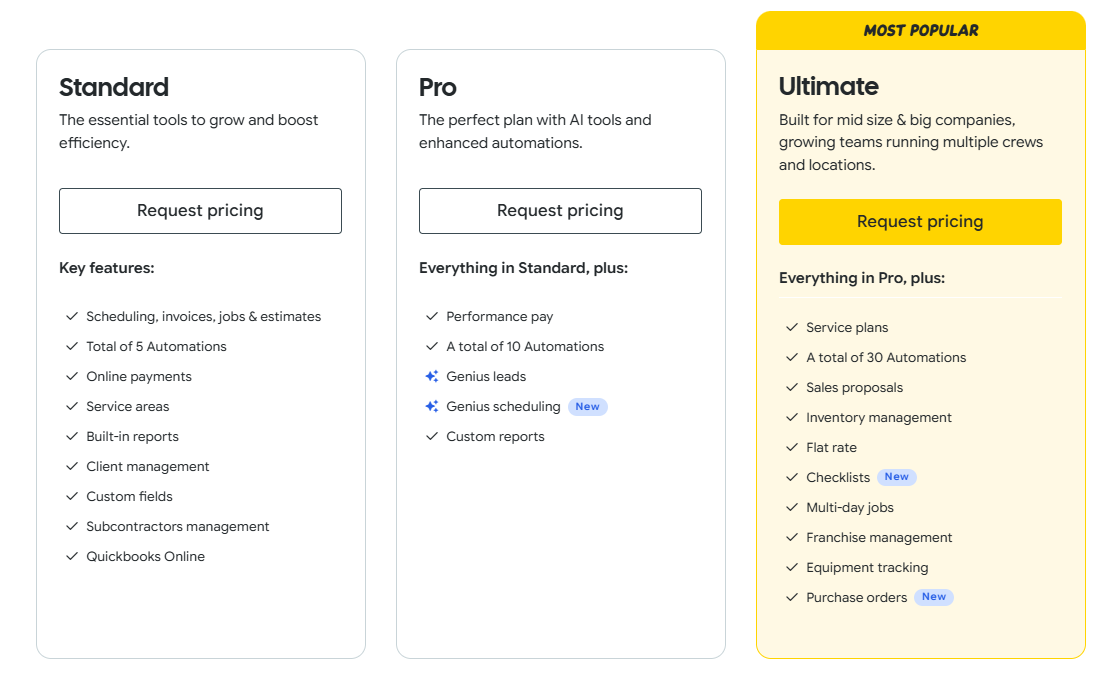
The Lite plan is free forever for up to 2 members, Standard at $225/month and Ultimate (contact the Sales and book a demo).
Pros and Cons
Pros
- rn t
- Smooth scheduling process.
- rn t
- Free tools.
- rn t
- Good customer support.
Cons
- rn t
- Login issues.
- rn t
- Sometimes technical glitches.
9. Contractor Foreman – Best for Small Construction Businesses
Contractor Foreman claims to be one of the most affordable construction scheduling software for contractors in 75+ countries. It covers everything from estimating, change orders, time cards, daily logs to job costing and you never have to pay extra money for your increased number of projects.
Key Features Contractor Foreman
- Team chat: Stay connected with all the team members through tools like project chat, real-time messaging, direct chat, group chat and get real-time updates directly from them.
- Crew scheduling tool: Enables you to schedule your employees or crews with the features like email and text schedule reminders, shift and individual scheduling, crews and team management.
- Easy calendars: With the calendars, you can have features like quick task creator, request time-off, sales and production calendar, employee date, week, month project view and more.
Plans and price
Contractor Foreman is absolutely free for the first 30 days for each plan. The plans include Basic at $49/month, Standard at $105/month, Plus at $166/month and Unlimited at $332/month.

Pros and Cons
Pros
- rn t
- Simple tracking.
- rn t
- Good customer support.
- rn t
- Crew scheduling.
Cons
- rn t
- Not so customizable.
- rn t
- Complex for new users.
10. TeamGantt – Best for Gantt Chart Scheduling
TeamGantt acts as an all in-one construction software for all your construction related tasks while viewing and managing tasks in the calendar. It even allows you to monitor total hours after assigning tasks in order to keep a track of every individual’s capacity in a team. Besides, you can easily share and upload files or documents to collaborate with others even better.
Key Features of TeamGantt
- Monitor team’s availability and workload: With TeamGantt, you can easily check whether everyone is working or not while managing resources, staying on budget and easy-to-access availability tabs.
- Reports and views: Enables you to view the reports and immediately check where and what tasks are pending. Check the status of all the tasks at a single platform.
- Real-time progress: Allows you to check the project’s status or real-time progress without even directly interacting with team members or scheduling a meeting.
Plans and price
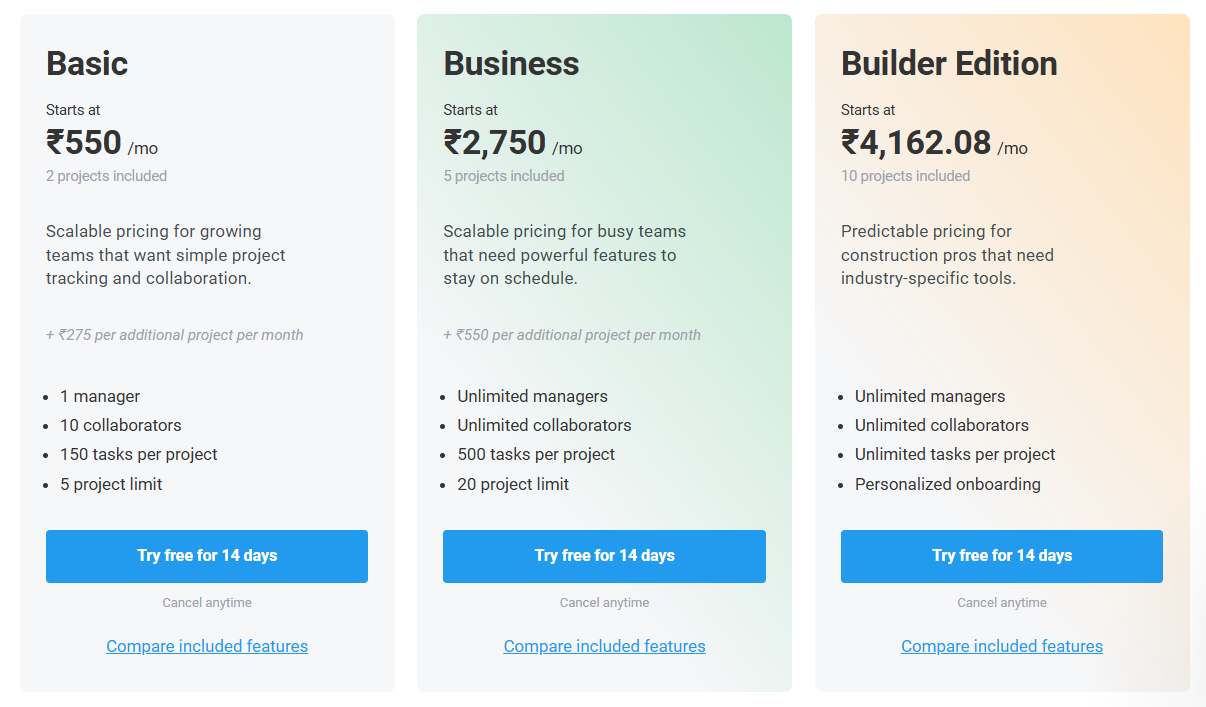
Contractor Foreman offers a 14-day free trial on all plans, including Basic starting at ₹550/month, Business at ₹2,750/month, and Builder Edition at ₹4,162.08/month with scalable pricing for construction teams.
Pros and Cons
Pros
- rn t
- Good for students or small projects.
- rn t
- User-friendly interface.
- rn t
- Real-time reports.
Cons
- rn t
- Poor integration.
- rn t
- Limited features in free plan.
How do you make a simple construction schedule?
Let’s now learn how we can make a simple construction schedule more efficiently in less time with the help of a construction scheduling software in 5 easy steps:
1. Collect information:
Before you start scheduling your construction activities, talk to the team members and gather all the information like materials they need or total time they want for specific tasks.
As a contractor or manager, you must also know the speciality of each member. Then, plan and assign the tasks or everything accordingly. Also, set a budget.
2. Prioritize tasks and discuss a deadline:
As a contractor or manager, you must know which task needs the highest priority and which team member is expert enough for such a task.
The tasks which need to be completed first, have to be given priority. Then, do not forget to discuss everything with members before giving a deadline straight away.
3. Assign tasks, communicate and make reports:
According to the speciality and experience of each and every member, try assigning tasks to all. It would help in saving time, money with 100% positive results.
Don’t forget to use the communication tools used by construction scheduling software like email, chat applications and more in order to stay connected and track real-time progress. Besides, you can also use the real-time reports.
4. Use charts and columns:
Use chart tools or columns like Gantt charts in order to keep everything separately including task name, time, deadline or task owner.
Such chart tools also help in analyzing the given time and the completion of time in order to compare both.
5. Observe and Evaluate
Then, you need to observe each step of individual team members and evaluate the allotted time and the completion hours or quality of the work with the help of bars and charts.
This will help you in calculating things better for future projects and analyzing the capacity of your team.
What key features should I look for in free construction scheduling software?
Now that we know the 10 best free construction scheduling software, let’s quickly move further and discuss the key factors that you should keep in mind before choosing such a software for your construction activities:
- Consideration of project size and complexity: By understanding your project size and requirements, you need to thoroughly go through all the features offered by your construction scheduling software.
- Compatibility with existing tools: Make sure that the scheduling tools like drag-and-drop calendars and more offered by the software are useful and compatible for your business and team.
- Scalability and future growth: Ensure that your construction scheduling software is scalable, easy to use, supports multiple devices and has all the features necessary for the future growth of your business and not just for a specific project.
- User support and training options: Make sure that you are using a construction scheduling software which provides necessary tutorials, user support and training options so that even if you’re a new contractor or small team managers, you can manage everything effectively.
- Reviews and recommendations from other construction professionals: Make sure that you are using a construction scheduling software that has good reviews and recommendations from other professional contractors to build trust.
FAQs
Can Excel be used for project scheduling?
Yes, Excel can be used for project scheduling as it uses spreadsheets, enabling you to have lists of tasks, starting and finishing dates in the separate columns.
How do I create a construction schedule in Excel?
You can create a construction schedule in Excel by using the separate columns divided on the basis of task’s owner, task’s name, end date, start date and so forth.
How does free construction scheduling software differ from paid options?
The free construction scheduling software allows you to enjoy almost all the high-quality features in a risk-free way according to the requirements and size of your project team.
Are free construction scheduling tools suitable for all sizes of construction projects?
Yes, almost all the free construction tools are suitable for all sizes of your construction projects.
How do I ensure that the free software integrates well with other project management tools?
We can check whether the software is using project management tools for different purposes or not. For example, for communication, using chat applications or for scheduling, using calendars.
What level of customer support can be expected with free construction scheduling tools?
We can expect various tutorials, constant technical support or training courses for you and your team from the free construction scheduling tools.
Conclusion
By going through the article, now we clearly know how a simple construction scheduling software can benefit you if you are a professional contractor with a dedicated team for free.
For this, we have listed the 10 best free construction software which offers us multiple features like crew scheduling tools, drag-and-drop calendars, progress tracking and more.
We are always aware of the primary factors that have to be kept in mind before choosing a construction scheduling software for you such as training support, scalability, reviews, compatibility with existing tools and many more.
Explore More Business Software Solutions
Best Sales Intelligence Software
Best Partner Management Software
Best Free Project Management Software
📌 Related: 10 Best Call Center Software for Businesses in 2026
📌 Related: 9 Best Business Intelligence Software Tools In 2026
